

- Automation
- Service Management
- Agents
- Atlassian Cloud
- Jira Service Management
- Atlassian Assist
- Conversational Ticketing
- Developer Experience
- Jira Helpdesk
- Support Automation
Conversational Ticketing in Jira Service Management
Learn how to set up and use conversational ticketing in Jira Service Management.

Users don’t want to leave their flow to get help, and support teams can’t afford delays in communication. That’s where Conversational Ticketing comes in. It's a modern support approach that integrates service desks directly into chat tools like Slack and Microsoft Teams, allowing employees to request and receive help from the platforms they already use daily.
Atlassian has made this even easier with Jira Service Management (JSM) Cloud, where Conversational Ticketing is natively available and powered by Atlassian Assist (formerly Halp). This solution helps support teams humanize the experience, improve efficiency, and simplify collaboration, all without needing an additional subscription.
This blog walks through the core functionality, setup process, and benefits of Conversational Ticketing in Jira Service Management.
What Is Conversational Ticketing?
Conversational Ticketing allows users to raise and manage service requests directly within Slack or Microsoft Teams. It eliminates the need to visit the Jira Service Management portal and enables real-time, two-way communication between service desk agents and requesters.
This approach humanizes the support experience by turning it into a natural conversation. Once a request is created, updates and responses flow within the chat, minimizing context switching and allowing issues to be resolved faster.
Benefits include:
-
Users can ask for help from where they already work.
-
Support teams stay close to requesters for better follow-up.
-
Ticket creation and updates happen seamlessly within chat.
-
The experience feels conversational rather than transactional.
Why It Matters
-
Widespread adoption: 65% of Fortune 500 companies now use Conversational Ticketing.
-
Efficiency: It streamlines communication and shortens response cycles.
-
Cost savings: It reduces the burden on service desk tools and lowers support costs.
-
User experience: It transforms ticketing into something intuitive, informal, and fast.
This isn't just about syncing data between platforms; it’s about enabling better service interactions and faster resolution, without adding friction.
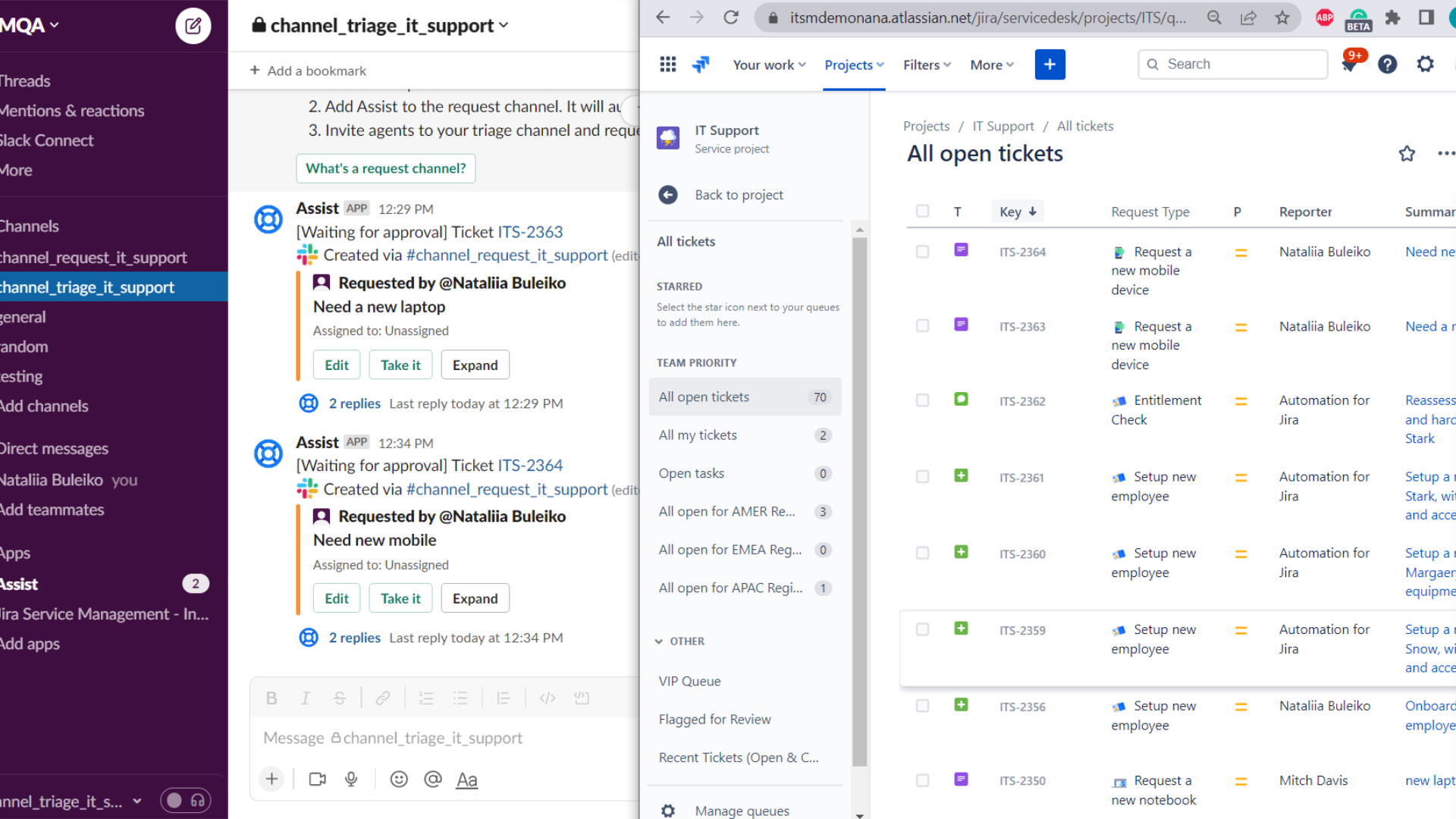
How Conversational Ticketing Works in Jira Service Management
-
Available natively in JSM Cloud at no additional cost.
-
Powered by Atlassian Assist, which connects JSM to Slack or Teams.
-
Users submit requests in Request Channels in Slack.
-
Support agents respond and manage those tickets in Triage Channels.
-
Slack channels can be either public or private.
-
Both users and agents communicate in real-time without leaving their chat environment.
You don’t need to know Atlassian Assist is running in the background; everything appears native to the end user, from ticket creation to resolution.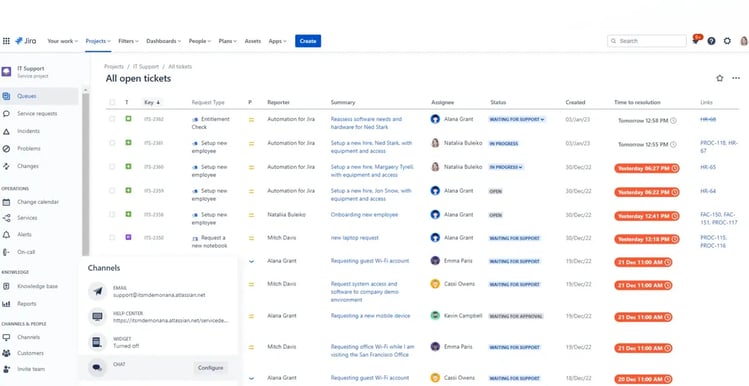
Setting It Up: No Code, Just a Few Clicks
Setting up Conversational Ticketing is straightforward for project admins:
-
Go to your Jira Service Management project.
-
Open Project Settings > Chat, or navigate to Channels > Chat.
-
Click Get started with Atlassian Assist.
-
Connect your Slack account or workspace.
-
Select the request types you want to be available in Slack.
-
Finish the setup in Slack by:
-
Creating and naming your Triage Channel (used by agents).
-
Creating your Request Channel (used by employees or customers).
-
Inviting the Assist bot to both channels.
-
From here, the integration is ready to go. When a user posts in the request channel, a Jira ticket is created, and the agent receives the request in the triage channel, no extra steps required.
Managing Channel Behavior and Auto-Ticketing
-
You can choose whether messages in request channels should automatically create tickets (auto-ticketing).
-
Auto-ticketing ensures no message is missed and simplifies intake.
-
You can enable this from JSM by navigating to Project Settings > Chat, and configuring auto-create issue from messages.
Alternatively, you can enable auto-ticketing via the Halp settings page:
-
Visit your Halp admin panel (e.g., your-site.halp.com).
-
Select the Request Channel you want to configure.
-
Toggle the auto-create ticket from message setting.
-
Save your changes.
This is especially useful when you want to make the Slack channel a single point of entry for all service requests.
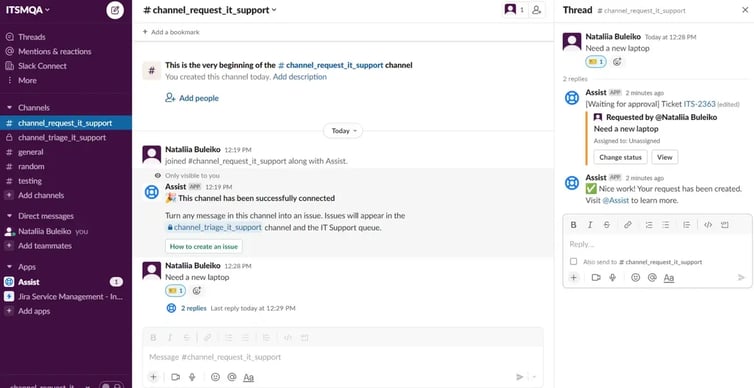
Keeping Requesters and Agents Aligned
-
Triage Channels are linked to specific JSM queues; this is where agents manage and work on tickets.
-
Request Channels are where users submit their requests.
-
Refreshing the JSM screen confirms that the correct triage and request channels are linked to the project.
You can create multiple channels per queue or project, and tailor the Slack setup to match your support team's structure.
The Experience in Action
Once the setup is complete:
-
A user sends a message in the request Slack channel: "I need a new monitor."
-
Assist bot recognizes the message and prompts the user to fill out a request form.
-
A ticket is created in Jira Service Management.
-
The agent sees the ticket in the triage channel and responds within Slack.
-
The conversation continues until the issue is resolved, all without switching platforms.
This flow supports faster resolution, more personal engagement, and better tracking.
Why Conversational Ticketing Is a Win for Everyone
-
For users: No portal login needed. They get help from Slack or Teams instantly.
-
For agents: Everything comes into one triage channel. They can work more efficiently with less context switching.
-
For admins: Easy to set up, configure, and manage. No additional cost, no need for separate subscriptions.
Ultimately, Conversational Ticketing brings a human, conversational layer to technical support. And with native integration in JSM Cloud, it’s a capability every team can benefit from, without the overhead of separate tools or complex setup.
Wrapping Up
Conversational Ticketing in Jira Service Management bridges the gap between end users and support teams by embedding service into the tools people already use. With Atlassian Assist, your team can simplify support delivery, humanize the requester experience, and move faster, without ever leaving Slack or Microsoft Teams.
Read next.
How to Review Rovo Agent Access in Jira and Confluence
A step-by-step access review for Rovo agents in Jira and Confluence: who can create them, who can use them, what they can change, and what gets logged.
September 24, 2026What Is Identity Debt in Atlassian Cloud Migration
Learn what identity debt means for Atlassian cloud migration and how to audit unowned accounts, stale permissions, and legacy access risks.
September 21, 2026Rovo Agent Governance in Atlassian Cloud: 2026 Guide
Learn how to govern Rovo agents in Atlassian Cloud with identity controls, Guard policies, workflow guardrails, and audit trails for enterprise AI adoption
September 19, 2026What Is Rovo Agent Governance in Atlassian Cloud
Learn how Rovo agent governance works in Atlassian Cloud, from permission models to admin controls, and configure AI agents securely.
The blog, weekly.
One email a week with what we published. No drip sequence, and you can leave in a click.