

Tech Dive into Making Rovo a Useful Tool in ITSM/JSM
Rovo can handle common JSM tickets through an agent that scans each new ticket for known keywords and matches them to Confluence knowledge base articles titled with those keywords. Having the agent's prompt decide whether to answer with the article or hand off to a human proved far more robust than parsing its output in the automation rule.

Atlas Bench recently set out to streamline IT Service Management (ITSM) by leveraging Atlassian’s new AI, Rovo. In this post, we walk through how we trained Rovo on our knowledge base, built a “Ticket Assistant” agent, and created smart automation rules. The goal: make Rovo a truly useful tool in ITSM by having it handle common tickets automatically and seamlessly escalate complex issues to humans. This journey involved some trial and error, but ultimately led to a reliable solution that enhances efficiency for support teams.
Training Rovo with Knowledge Base Articles
-
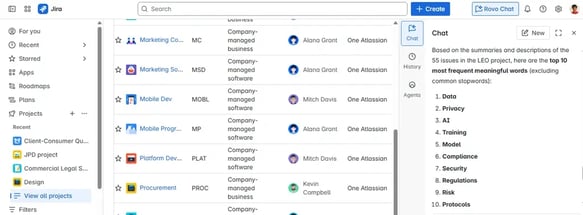
Analyze Ticket Data: We began by evaluating our existing support tickets to identify patterns. Using Rovo’s data analysis, we pulled out the top 10 most frequently used words in incoming tickets. This revealed the recurring themes users ask about.
-
Identify Top Keywords From that analysis, the top 5 keywords stood out: Data, Privacy, AI, Training, and Model. These keywords represent the most common topics in support requests, so they became our focus for training Rovo.
-
Link Relevant Articles: For each top keyword, we created or identified a Confluence knowledge base article addressing that topic. We ensured each article’s title or header exactly matches the keyword (for example, a “Privacy” article for privacy-related questions). This way, Rovo can easily find the right content when those terms appear in a ticket.
-
Gap Analysis: We also performed a gap analysis to see if any frequent issues lacked documentation. For any missing topics, we created new knowledge base articles and tagged them appropriately. By filling these gaps and labeling articles clearly, we built a robust knowledge repository that Rovo can draw from when assisting users.
Creating the ‘Ticket Assistant’ Rovo Agent
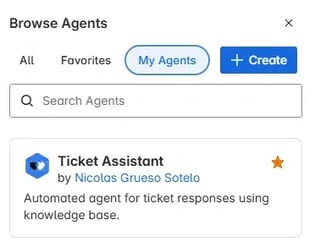
With the knowledge base in place, the next step was to set up Rovo as a virtual support agent. We created a new Rovo agent aptly named “Ticket Assistant” within our JSM project. This agent was configured with clear instructions on how to handle incoming tickets using the knowledge base: it scans each new ticket’s text for the known keywords and matches them to the relevant Confluence article. For example, if a ticket mentions “Data,” the agent should find and suggest the Data article to resolve the issue. The Ticket Assistant’s mandate is to be efficient and accurate, providing the appropriate article for quick resolution or flagging the ticket for a human agent if it can’t confidently find an answer. We also instructed the agent to maintain a polite, professional tone in its responses, ensuring a good user experience.
Initial Automation Rule and Challenges
-
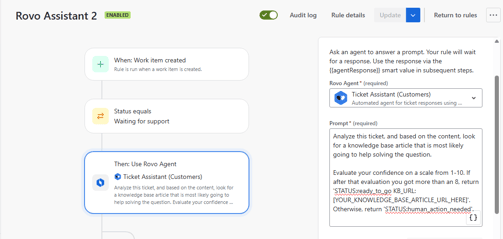
Automation Setup: We built an automation rule in Jira Service Management to empower the Ticket Assistant agent. The rule triggers whenever a new ticket is created and reaches the “Waiting for support” status. At that point, the rule engages our Rovo “Ticket Assistant” agent with a prompt to analyze the ticket’s content and find a helpful knowledge base article.
-
Confidence-Based Response: The agent’s prompt was designed to include a self-confidence check. We asked Rovo to evaluate its confidence (on a 1–10 scale) in solving the ticket using the knowledge base. If the confidence score is above 8, the agent should respond with a status indicating it’s ready to go and provide the URL of the relevant article (formatted as
STATUS:ready_to_go KB_URL: [article link]). If the confidence is 8 or below (meaning the query is unclear or no article fits well), it should respond withSTATUS:human_action_neededto signal that a human should take over. -
Branching Automation Logic: Based on Rovo’s response, our rule had two paths. In the “ready_to_go” case, the automation would add a public comment to the ticket containing the knowledge base article link that Rovo identified, effectively giving the customer an immediate answer. It would resolve the ticket or await customer feedback. In the “human_action_needed” case, the automation would comment that the issue will be handed to a human agent (since no article was found to directly help) and automatically assign the ticket to a human (in our case, to a specific agent named Nicolas).
-
Technical Hurdle: We implemented a smart value
to parse the first word of Rovo’s output (i.e., the STATUS). This worked initially: on the first run, Rovo correctly returned a status and the rule acted accordingly. However, subsequent runs hit a snag. The automation logs showed an error: “Failed to get value for agentResponse.split(' ')[0].” This meant that theagentResponsewas coming through empty or null in those runs, so the rule couldn’t split text that wasn’t there. It was puzzling, because in testing, Rovo did return a string. Despite double-checking the rule and smart value syntax, the issue persisted, causing the automation to fail. After some troubleshooting with no resolution, we decided to try a different approach to achieve our goal.
Refining the Automation Approach for Success
Our second approach took a more direct strategy: we modified the Rovo agent’s prompt so that the agent itself would handle the conditional logic and perform the appropriate action, rather than returning a code for the automation rule to interpret. In practice, this meant instructing Rovo to not only decide on the status but also execute the next step. The new prompt still asked Rovo to analyze the ticket and assess confidence as before, but we added explicit instructions for each outcome. If Rovo deemed it was “ready_to_go” with high confidence, we told it to attach the relevant knowledge base article and provide an answer to the customer right away. If Rovo decided “human_action_needed,” we told it to respond to the customer with a polite message that a human agent will handle the issue. Importantly, we also instructed Rovo not to reveal its internal confidence score or the “STATUS” text to the user; those are just for internal logic. Essentially, Rovo was now entrusted to do the work: choose the path and carry it out by commenting on the ticket appropriately. This adjustment eliminated the need for complex smart value parsing in the automation rule. We simply trigger the agent on new tickets and let Rovo’s own response dictate the outcome. This refined approach proved to be far more robust, as it bypassed the previous parsing error and simplified the automation.
Rovo in Action: Handling Requests
-
In testing, the improved setup worked seamlessly. For example, when a user submitted a ticket asking, “I would like to know more about privacy inside my company,” Rovo recognized the keyword “Privacy.” The agent confidently pulled up the Privacy knowledge base article and automatically replied to the ticket with a helpful summary and a link to that article. The user received an immediate, relevant answer without any human intervention.
-
In contrast, when we tested a ticket that fell outside the prepared topics (e.g., a question like “Can I go on holidays on Christmas?”), Rovo couldn’t find a matching knowledge base article. In this case, the agent responded with a courteous note that the query would be handed over to a human representative. The automation then assigned the ticket to a human agent for follow-up. This confirmed that Rovo was correctly identifying when it should step back and let a person take over, ensuring the user’s request wouldn’t fall through the cracks.
-
These scenarios demonstrated that our Rovo “Ticket Assistant” and the automation rule were now working in harmony. Common issues get instant answers sourced from our knowledge base, while unusual requests get the personal attention they need. The service desk team can trust that straightforward tickets are being handled efficiently, freeing up human agents to focus on more complex problems.
Enabling Atlassian’s New Service Agent Feature
-
We also explored Atlassian’s new feature for creating service agents directly from the platform’s interface (Atlassian Studio). This feature allows you to spin up a specialized AI agent for your customer portal with just a few clicks. To use it, we navigated to Atlassian Studio and chose the option to create a new agent. We were prompted to select the JSM project where this agent would operate.
-
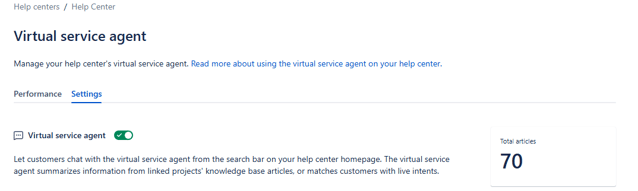
After creating the agent, the next crucial step was activation. We went to our JSM project’s Help Center (customer portal) settings and enabled the newly created agent for that portal. Activating the agent means it will start listening and responding to requests on the portal as configured.
-
The result of enabling a service agent on the portal is a more interactive help experience for end-users. Customers submitting requests get real-time, one-on-one assistance from the AI agent. The agent can answer common questions or guide users, leveraging the same knowledge base we provided, before a ticket even reaches a human. This feature extends Rovo’s usefulness beyond just internal automation rules to direct customer-facing support, helping users get answers faster and reducing the load on the support team.
Next Steps
Integrating Rovo into our ITSM workflow has been a learning experience with a very positive outcome. We started by enriching Rovo with the knowledge base it needed to tackle frequent support questions, then we iteratively refined our automation approach to let the AI work smarter. The initial rule attempt taught us about the quirks of parsing AI output, and the successful second attempt showed the power of giving the AI clear instructions to act autonomously. With the “Ticket Assistant” agent now reliably handling routine tickets and Atlassian’s new service agent capabilities on the horizon, we have taken a significant first step toward a more automated, efficient support process. Our team can now focus more on complex inquiries while trusting Rovo to cover the basics. As we continue to expand our knowledge base and refine Rovo’s training, we expect even greater value from this AI-driven approach to ITSM.
Read next.
How to Review Rovo Agent Access in Jira and Confluence
A step-by-step access review for Rovo agents in Jira and Confluence: who can create them, who can use them, what they can change, and what gets logged.
September 24, 2026What Is Identity Debt in Atlassian Cloud Migration
Learn what identity debt means for Atlassian cloud migration and how to audit unowned accounts, stale permissions, and legacy access risks.
September 21, 2026Rovo Agent Governance in Atlassian Cloud: 2026 Guide
Learn how to govern Rovo agents in Atlassian Cloud with identity controls, Guard policies, workflow guardrails, and audit trails for enterprise AI adoption
September 19, 2026What Is Rovo Agent Governance in Atlassian Cloud
Learn how Rovo agent governance works in Atlassian Cloud, from permission models to admin controls, and configure AI agents securely.
The blog, weekly.
One email a week with what we published. No drip sequence, and you can leave in a click.