

Resolving Duplicate Entries with JSM's Assets Feature
Keep your IT asset data clean and accurate by using Jira Service Management Cloud Assets to prevent duplicate entries.

Introduction
Maintaining a clean and accurate IT Asset Management (ITAM) system is crucial for efficient operations, compliance, and informed decision-making. A common and frustrating challenge, especially at scale, is the creation of duplicate asset entries when existing asset data is updated. This document outlines how Jira Service Management (JSM) Cloud's "Assets" feature directly addresses this inconvenience, ensuring that updates to asset information modify existing records rather than generating new, redundant ones.
The Problem: Accidental Asset Duplication
Imagine you have a laptop recorded in your ITAM system. When its operating system is upgraded, its RAM is increased, or it's assigned to a new user, your current system might mistakenly log these as new assets. This leads to a cascade of problems:
-
Bloated and Inaccurate Inventory: Your ITAM system becomes cluttered with multiple entries for the same physical asset, making it impossible to trust your data.
-
Misleading Reporting: Reports on asset age, depreciation, utilization, and compliance become unreliable, leading to flawed strategic decisions and budget misallocations.
-
Operational Inefficiencies: Your team wastes time investigating discrepancies, manually merging records, and performing unnecessary audits.
-
Compliance Risks: Auditing software licenses or device compliance becomes a nightmare, potentially leading to costly penalties.
The Solution: JSM Cloud Assets for Intelligent Data Management
JSM Cloud's "Assets" feature is designed from the ground up to be a robust Configuration Management Database (CMDB) that prevents duplicate entries by intelligently managing asset data and relationships. It’s built to ensure that updates simply update the single, authoritative record for each asset.
Here's how JSM Cloud Assets tackles the duplicate problem:
1. Establishing Unique Identifiers
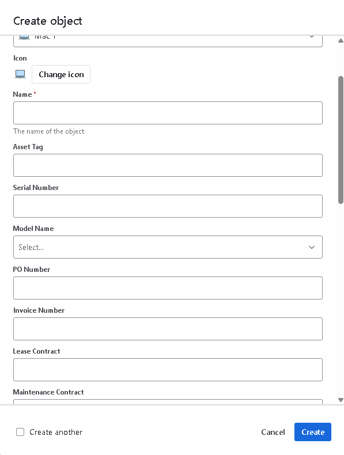
The foundation of de-duplication in JSM Assets lies in defining unique identifiers for each Object Type. When you create an Object Type (e.g., "Laptop," "Software Application," "Monitor"), you configure specific attributes (like "Serial Number" for a laptop or "Application Name" + "Publisher" for software) as unique.
-
How it works: JSM uses these unique attributes to recognize if an incoming piece of data corresponds to an existing asset. If it finds a match, it knows it's an update, not a new asset.
-
Benefit: This is the first line of defense against duplicates. If two incoming records have the same serial number, JSM will treat them as the same asset.
2. Smart Data Import and Reconciliation
JSM Cloud Assets offers sophisticated mechanisms to import and reconcile data from various sources, whether from discovery tools or manual imports.
-
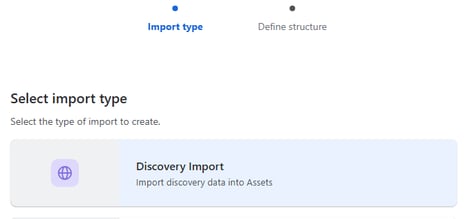
Controlled Import Options: When importing data (e.g., via CSV, JSON, or through integrated discovery tools), JSM Assets provides clear options for how to handle existing records:
-
Update existing and create new: If a match is found based on unique identifiers, the existing asset's attributes are updated. If no match, a new asset is created.
-
Create only: Only creates new assets, ignoring existing ones.
-
Update only: Only updates existing assets, ignoring new ones.
-
Benefit: This granular control ensures that your updates flow into existing records.
-
-
Data Manager (JSM Cloud Premium & Enterprise feature that is currently in Open Beta): For large-scale data synchronization from multiple sources (like JumpCloud, SCCM, Intune, or even custom databases), Data Manager is a game-changer. It's purpose-built for:
-
Consolidation: Bringing data from disparate systems into one central CMDB.
-
Reconciliation Rules: You define the logic for how Data Manager identifies and merges duplicate entries. For instance, you can tell it that if the "Serial Number" from JumpCloud matches an existing JSM asset, then update its "OS Version" or "Assigned To" attribute.
-
Automated Cleansing: Data Manager provides a clean, unified view of your assets by automatically removing redundancies.
-
Benefit: This is the ultimate tool for overcoming large-scale duplication. When a laptop's OS is updated in JumpCloud, Data Manager recognizes the existing laptop in JSM and simply updates its OS attribute, preserving a single, comprehensive history for that asset.
-
3. Asset Discovery (JSM Cloud Premium & Enterprise)
For dynamic environments, Assets Discovery (available with JSM Cloud Premium & Enterprise plans) automatically scans your network and endpoints. Its intelligence lies in:
-
Identifying Changes: It detects changes in asset attributes (like an OS upgrade or new software installation).
-
Updating Existing Records: Crucially, if it finds an asset it has already discovered (based on unique identifiers like MAC address, hostname, serial number), it will update the corresponding object in JSM Assets rather than creating a new one.
-
Benefit: It provides a highly automated way to keep your ITAM system accurate and current without manual intervention or creating duplicates.
4. Relational Object Linking
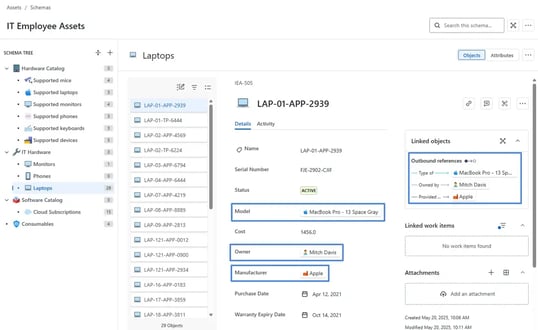
JSM Assets is built on a relational model, allowing you to link different types of objects together (e.g., a "Laptop" linked to an "Employee," an "Operating System," and multiple "Software Applications").
-
How it works: When you create a Reference Attribute on an object (e.g., "Installed Software" on a "Laptop"), you're linking to an existing software object. If that software object's version attribute gets updated (e.g., from Photoshop 2023 to 2024), the link from the laptop remains valid, and the laptop is simply associated with the updated software object. You don't create a new software entry or a new laptop entry.
-
Benefit: This ensures a holistic view of each asset, with all its associated components and software accurately reflecting their current state within a single record.
Key Takeaways for Your Organization
By leveraging JSM Cloud Assets, you can transform your asset management from a chaotic, duplicate-ridden process into a streamlined, accurate, and reliable system:
-
Single Source of Truth: Gain confidence in your asset data as JSM becomes the authoritative record.
-
Automated Accuracy: Reduce manual effort and human error in data entry and updates.
-
Improved Compliance: Easily audit your software licenses and device configurations with clean data.
-
Enhanced Reporting: Make data-driven decisions based on real, current information, not fragmented records.
Read next.
Non-human identities in Atlassian Cloud, explained
How to govern non-human identities in Atlassian Cloud: service accounts, API tokens, Forge apps, and Rovo agents, each with an owner, scope, and expiry.
October 1, 2026How to choose an Atlassian partner for a Jira migration
How to choose an Atlassian Solution Partner for a Jira migration to Cloud: what to verify, eight questions to ask, red flags, and a shortlist scorecard.
September 30, 2026The complete guide to agent readiness in Atlassian Cloud
Agent readiness for Atlassian Cloud: the five checks to run before you switch on Rovo agents, from identities and permissions to the off switch.
September 28, 2026How to review Rovo agent access in Jira and Confluence
A step-by-step access review for Rovo agents in Jira and Confluence: who can create them, who can use them, what they can change, and what gets logged.
The blog, weekly.
One email a week with what we published. No drip sequence, and you can leave in a click.