

The AI Technologies Behind Speech Editing at Loom
Discover how Loom’s cutting-edge AI voice cloning technology allows you to edit spoken words in videos without re-recording.

Loom’s new speech editing feature is a game-changer for video creation. It allows you to update parts of a video’s audio instantly, without having to re-record anything. Using advanced AI that can clone your voice, this technology seamlessly inserts new words or phrases into your speech for example, swapping out a name or a company detail and the edited video still sounds completely natural. This makes creating and updating video content faster, more flexible, and highly personalized.
In early 2025, Loom rolled out this capability to enable hyper-personalized videos at scale. The idea is simple: you record a video once, and then the AI lets you generate multiple custom versions of that video in your own voice, without repetitive manual work. For instance, you could create a single welcome video and later tailor it to different clients by changing just a few words. Imagine recording a greeting where you say, “My name is Christo, and I lead the relationship between ScaleAI and Loom.” With speech editing, you can instantly change that line for a different client it becomes “My name is Jeff, and I lead the relationship between Amazon and Loom” and it will sound as if you actually said those words in the original recording. You could do the same for Google, Meta, Apple, or even Atlassian, all from the same initial video. Similarly, if one version of your video mentions “the Loom Notion integration,” you can easily produce another version that says “the Loom Confluence integration” for a different audience, without recording a new voiceover. All these edits maintain your voice’s tone and flow, making it seem like you re-recorded the video each time when, in reality, the AI handled the changes for you.
The Unique Challenges of Editing Speech
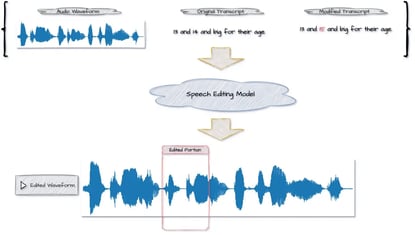
Editing spoken audio is far more complex than simply generating speech from scratch. Traditional text-to-speech (TTS) systems can synthesize entire sentences in a given voice, but they don’t have to worry about fitting those sentences into an existing recording. Speech editing, by contrast, means modifying specific portions of an existing audio recording while leaving the rest intact. The challenge is to surgically replace or insert words without the listener noticing any glitch or jump in quality. The edited segment must blend perfectly with the original audio around it in terms of voice tone, speed, and background sound. In essence, the goal is for the new words to sound as if they were part of the original recording all along.
To appreciate the complexity, consider what happens if you tried to patch a recording by just inserting a clip from a standard TTS engine. The new audio often sticks out it might have a different pitch, energy, or acoustic profile than the surrounding voice. The human ear is very sensitive to such inconsistencies; even a subtle change in microphone noise or speaking rhythm can be jarring. That’s why Loom’s speech editing takes a context-aware approach. It uses three key inputs your original audio, the transcript of that audio, and the transcript with the desired edits and works out how to implement the changes with minimal disturbance to the original recording. Essentially, the system must generate only the small section of audio that needs changing, and do so in a way that matches the original speaker’s tempo, intonation, and vocal style at the boundaries. This “least invasive” method ensures any artifacts or imperfections in the generated speech are masked by the surrounding untouched audio, which acts as a natural anchor. Achieving this level of coherence is a tall order and sets the stage for the sophisticated solution Loom engineered.
A Universal AI Model for All Voices (Zero-Shot Learning)
From the outset, the team behind Loom’s speech editing chose to build a universal AI model that can work with any user’s voice without additional training. This approach, known as zero-shot learning, means the system doesn’t need to create a custom voice model for each person. Training one model to handle everyone’s voice is certainly challenging, it requires an extremely powerful model and a huge amount of diverse speech data but it has big advantages over the traditional, per-user voice cloning method. Here’s why Loom’s zero-shot model approach matters:
-
No waiting or onboarding: With a universal model, new users can start using speech editing immediately. There’s no need to provide a lengthy voice sample and then wait minutes or hours for an AI to train on it. In contrast, many conventional voice-cloning services make you record a sample and then keep you waiting while they build a custom model of your voice. Loom’s approach skips that wait entirely.
-
Simpler, safer data handling: No personal voice model means no sensitive voice data stored for each user. Traditional fine-tuned systems have to save your speech samples or voice print, raising security and privacy concerns. Loom’s single model serves everyone without retaining individual voice profiles, which greatly reduces the risk and complexity of managing personal data.
-
Lower engineering complexity: Maintaining one general model is far simpler than training and deploying hundreds or thousands of individual models. The development team doesn’t have to juggle separate training pipelines, databases of user-specific models, or custom model retrieval for each playback. This streamlines everything from development and testing to infrastructure and means fewer things can go wrong.
-
Faster performance for users: Because the same model works for all users, the system can keep that model loaded in memory and ready. There’s no need to swap out models or fetch a specific user’s model from storage whenever someone edits a video. This eliminates a whole layer of delay, making the speech editing experience as close to real-time as possible.
-
Cost-effective and accessible: Training one large model might be expensive up front, but it’s a one-time cost. Serving many users with that single model is much more cost-efficient than training a new mini-model for each user. This efficiency makes it feasible for Loom to offer the feature to a wide audience without an exorbitant price tag. In short, the zero-shot strategy helps make advanced voice editing technology more accessible to more people.
By investing in a robust universal model, Loom essentially did the heavy lifting in advance. The upside is that when you use the feature, the AI can instantly adapt to your voice based on just the context in your recording, and start generating speech in that style on the fly. It’s a remarkable feat the model generalizes to new voices without explicit training and it lays the groundwork for how the system operates.
Training the Model with Masked Acoustic Modeling
How do you teach an AI to fill in a small gap in a recording so perfectly that no one can tell the audio was altered? Loom’s answer lies in a technique called Masked Acoustic Modeling (MAM). This training approach is inspired by how certain language models learn to fill in missing words in sentences. In Loom’s case, the AI learns to fill in missing pieces of audio.
During training, the model is given real speech recordings but with random sections of the audio deliberately masked out. The task for the AI is to predict those missing pieces of sound based on the surrounding audio context and an accompanying transcript. In other words, the model practices “audio infilling”, much like patching a hole in an image such that you can’t tell the hole was ever there. By doing this on a massive scale, the model gradually learns not just to generate speech, but to generate it in a way that blends seamlessly with existing audio.
This is crucial for coherence. The model has to account for the acoustic properties of the context things like the speaker’s timbre, pitch, accent, background noise as well as prosodic features like the speaking rate and intonation. For example, if the segment to insert comes after a word the speaker said with an upbeat tone, the model should continue with that intonation. If there’s light background hum in the original, the generated piece should have it too. Masked Acoustic Modeling effectively trains the AI to match all those details. By the end of training, the model can take an audio clip with a part missing and magically fill in the gap with new speech that sounds like it was never missing. This MAM approach provides the foundation that makes Loom’s speech edits so natural. The model isn’t generating audio in isolation; it’s context-aware, always considering what comes before and after the edit, so the final output is one continuous, believable stream of speech.
How Loom’s Speech Editing Works (Step-by-Step)
Behind the scenes, Loom’s speech editing pipeline involves several stages, each addressing a piece of the problem. Here’s a simplified step-by-step breakdown of how a recorded Loom video goes from original to edited version using AI:
-
Convert audio to a spectrogram: First, the original recorded audio waveform is transformed into a Mel spectrogram essentially a visual representation of the sound. This is like turning audio into an “image,” where one axis is time, the other is frequency, and the intensity of pixels indicates sound volume at a given frequency. By converting audio to this format, editing becomes analogous to editing an image. In fact, the AI treats filling in a gap in the audio similarly to an image inpainting task, where it fills in missing pixels in a picture. This spectrogram conversion condenses the raw audio and sets the stage for precise, segment-by-segment editing.
-
Prepare the transcripts (text and phonemes): Next, the system takes both the original transcript and your modified transcript and processes them for the speech model. This involves two sub-steps. First, text normalization: the written text is converted into a form that sounds like natural spoken language. For example, a date like “Jan 01, 2025” would be normalized to “January first, 2025,” and an abbreviation like “St.” would become “Saint.” This step ensures that numbers, dates, abbreviations, and other non-verbatim elements are turned into words the way a person would say them out loud. Second, phonetic transcription: after normalization, the cleaned-up sentences are converted into a sequence of sounds. Essentially, the system breaks down the words into phonemes the basic sound units so it knows exactly how each word is pronounced. For instance, a name like "Atlassian" would be transcribed into phonemes that capture its pronunciation. By the end of this step, the system has two aligned sequences of phonemes: one for the original speech and one for the edited speech we want to generate.
-
Align audio with the original transcript: Now comes the alignment stage. A forced aligner algorithm takes the original audio and its phoneme transcript, and figures out precisely when each sound occurs in the audio. In practice, this means determining the start and end time for every phoneme in the original recording. For example, if the word “Loom” starts half a second into the video and ends at 1 second, the aligner maps those timing boundaries for each phoneme /l/ /uː/ /m/. This phoneme-level timing map is crucial because the system needs to know exactly which part of the audio to replace or where to insert new audio. Loom’s team actually built a custom alignment model to achieve high accuracy here, since off-the-shelf aligners weren’t sufficient for real-time, word-level precision. After this step, the system knows, for instance, that the name “Christo” in the original audio occupies a certain slice of the spectrogram, from time X to Y.
-
Identify the changes (diff the transcripts): With both phoneme sequences in hand and alignment info from the original, the system now pinpoints what needs changing. It compares the two sequences to see which words are deleted, inserted, or replaced. This is essentially a text “diff” operation, similar to comparing two versions of a document. For example, it might find that in the original you had the phoneme sequence for “Christo,” but in the new transcript you have the sequence for “Jeff.” That tells the system these phonemes need replacing. The output of this comparison is a marked-up list of segments: some segments are unchanged, some are to be removed, some are new insertions, and some are replacements. This gives a clear blueprint of which parts of the audio spectrogram will be edited or generated afresh.
-
Predict the duration of new speech: Knowing what new words need to be inserted is one thing but the system also needs to know how long those new words should last to sound natural. Different words take different amounts of time to say, even in the same voice. For instance, saying “Alexander” might naturally take longer than saying “Alex.” So, the next step uses a duration prediction model to estimate the timing for each new phoneme or word that will be added. The model looks at the surrounding context and the phonemes of the new word to predict a reasonable duration for each. Continuing the example, it would predict how many spectrogram time-columns “Jeff” should occupy when spoken by this voice, given how the speaker’s pacing is in the rest of the recording. These duration estimates ensure that when the new audio is generated, it won’t sound rushed or drawn-out it will slot into the gap with natural timing.
-
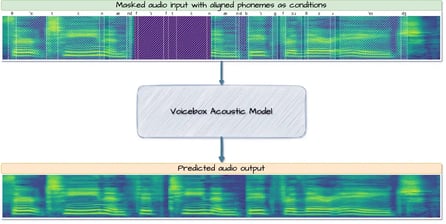
Craft a merged “masked” spectrogram: At this point, the system constructs a preliminary version of what the final spectrogram should look like, combining the original audio that will remain and placeholders for the parts that will change. Essentially, it takes the original spectrogram and removes the sections that correspond to words we want to delete or replace. In those spots, it inserts a blank area of the appropriate length for the new content. If a segment was completely deleted with nothing to replace it, that portion is just removed altogether, shortening the spectrogram. If new words are being inserted where there was silence before, a blank segment is added. The result is a spectrogram that is partly filled with real audio and partly empty. Think of it like a puzzle: we have pieces of the original recording and holes where new pieces need to go. This masked spectrogram and the target phonemes for those holes are now handed off to the core AI model for infilling.
-
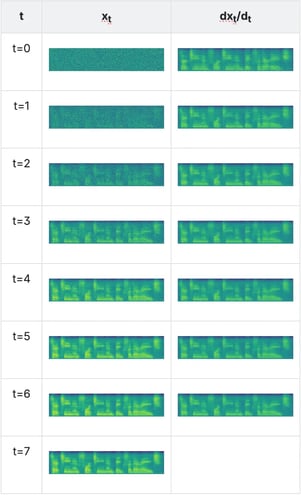
Generate the new audio for the gaps: Now the magic happens. The AI acoustic model takes the masked spectrogram with the blank sections and infills those sections with new audio. It knows what phonemes it’s supposed to produce in each gap, and it has the surrounding spectrogram context as a guide. Using these, it synthesizes the missing part in a way that matches both the target phonemes and the style of the neighboring audio. Under the hood, this model uses a sophisticated generative technique to gradually transform initial noise in the blank sections into coherent speech. Over a series of iterative steps, the model refines the output in each masked region from random noise into clear speech that says the desired words. Throughout this process, it ensures continuity the new audio’s pitch, volume, and tone transition smoothly from the preceding original audio and into the following original audio. The end result of this step is a complete Mel spectrogram where the previously empty slots are now filled with generated speech, effectively “patching” the original spectrogram with the new phrases. For example, the gap where “Jeff” needs to be is now filled with a spectrogram segment that represents someone saying “Jeff” in the same voice and manner as the original speaker.
-
Convert the spectrogram back to sound: The final step is to transform the edited spectrogram back into an actual audio waveform that you can play and hear. To do this, Loom uses a vocoder a type of neural network that can synthesize sound from a spectrogram. The vocoder takes the completed spectrogram and generates the corresponding waveform. This essentially reverses the process from step 1. The result is a new audio track for the video where the edits have been applied. Importantly, the vocoder works in a way that preserves audio quality, so the output sounds natural and fluid. In practice, Loom experimented with different vocoder models, and found that any quality modern vocoder does the job well. The key is that after this step, we have an edited audio clip where you can’t tell that certain words were never spoken in the original take the voice, background, and timing all sound consistent.
After these steps, Loom replaces the original audio segment in the video with this newly generated audio. The video creator can then play back their video and hear the updated line as if they had recorded it that way originally. All of this happens in a matter of seconds. From the user’s perspective, you simply select some text in your transcript, type a new word or phrase, and the system “rewrites” your spoken words in the video almost instantly. Under the hood, however, you can now appreciate the elaborate dance of AI components working together to make that possible.
Safeguards for Responsible Use
With great power comes great responsibility, and Loom has been mindful of the ethical implications of such a powerful voice editing tool. The ability to mimic someone’s voice and alter speech can be misused if proper safeguards aren’t in place. Here are the key measures Loom implemented to ensure responsible use of speech editing:
-
Available only to the video’s creator: Only the person who recorded a Loom video can use the speech editing feature on that video. Even if you share a Loom or give others edit access, they will not be able to alter your voice recording. This prevents any scenario where someone might try to put words in someone else’s mouth using the tool.
-
Not allowed on external or imported content: Speech editing is disabled for videos that were uploaded to Loom and for any Loom meeting recordings. In short, you can only edit speech on content you created through Loom yourself. This avoids the possibility of taking an audio clip of another person and manipulating it without consent.
-
Explicit user confirmation: Whenever you use the speech editing function, Loom will ask you to confirm that you are altering your own voice. Users must actively acknowledge that they understand the feature is only to be used on their own speech. This prompt serves as both a reminder and a form of consent, helping ensure people don’t inadvertently or deliberately misuse the feature on someone else’s voice.
-
No personal data used for AI training: Loom’s speech editing AI was trained entirely on publicly available datasets no user’s private recordings or personal voice data are fed into the model. The system also doesn’t store your voice or create a saved model of your voice after you use it. In other words, the AI cannot learn an individual’s voice to reuse later, beyond the on-the-fly processing it does to generate the immediate edit. This approach protects user privacy and prevents the AI from accumulating a dangerous library of voice prints.
-
Activity logs and monitoring: All speech edit actions are logged on Loom’s backend. These logs can be audited if there’s ever a need to investigate misuse. Loom’s team also conducts ongoing reviews and research around this feature to catch any emerging risks. They are continuously monitoring how the tool is used in the wild and gathering user feedback, so they can update policies or technology to address potential issues proactively. By tracking usage and staying vigilant, Loom aims to nip any abuse in the bud and ensure the feature remains a force for good.
Thanks to these safeguards, Loom’s speech editing stays on the right side of innovation empowering users without compromising trust. It’s a thoughtful balance of offering cutting-edge capabilities while also building in checks to prevent the most worrisome scenarios from materializing on the platform.
Wrapping Up
Loom’s AI-driven speech editing showcases how advanced technology can make video communication more dynamic and user-friendly. By solving the hardest parts of audio editing with AI, Loom gives creators the freedom to polish and repurpose their videos in ways that simply weren’t possible before. Need to update a figure or correct a name in a recording? Now it’s as easy as editing text, and you get a smooth audio fix in your own voice. As this technology matures, we can expect video content to become even more fluid and adaptable no longer limited by getting everything perfect in one take. Loom’s innovation here is a glimpse of how AI can reduce tedious rework and enable more evergreen, personalized content. It’s an exciting development for anyone who creates videos, and a promising sign of how AI will continue to augment our productivity in creative tasks.
Read next.
Non-Human Identities in Atlassian Cloud: Service Accounts, Tokens, Apps, and Agents
How to govern non-human identities in Atlassian Cloud: service accounts, API tokens, Forge apps, and Rovo agents, each with an owner, scope, and expiry.
October 1, 2026How to Choose an Atlassian Partner for a Jira Cloud Migration
How to choose an Atlassian Solution Partner for a Jira Cloud migration: what to verify, eight questions to ask, red flags, and a shortlist scorecard.
September 30, 2026The Complete Guide to Agent Readiness in Atlassian Cloud
Agent readiness for Atlassian Cloud: the five checks to run before you switch on Rovo agents, from identities and permissions to the off switch.
September 28, 2026How to Review Rovo Agent Access in Jira and Confluence
A step-by-step access review for Rovo agents in Jira and Confluence: who can create them, who can use them, what they can change, and what gets logged.
The blog, weekly.
One email a week with what we published. No drip sequence, and you can leave in a click.