


Rovo Chat is Atlassian’s conversational AI assistant designed to help users quickly retrieve information from their company’s knowledge base or perform actions in context (like updating a Confluence page or finding a Jira ticket). With its intuitive chat interface and deep integration across Atlassian apps, Rovo Chat streamlines daily workflows and gives teams instant access to the knowledge they need. Since its launch, Rovo Chat’s capabilities have grown steadily to meet the evolving needs of modern enterprises. Atlassian’s engineering team has continually iterated on the product, leveraging the latest advances in AI and listening to user feedback to deliver the strongest possible experience. One of the biggest evolutions in Rovo Chat is its move to a multi‑agent orchestration framework. In this post, we’ll explore what that means, why Atlassian adopted a multi-agent approach, and how it enables Rovo Chat to handle complex requests more flexibly and accurately. We’ll also touch on the journey Atlassian took to arrive at this design and the improvements it unlocked for users. By the end, you’ll see how these behind-the-scenes changes translate into a smarter, faster AI assistant for your team.
Why Multi‑Agent Orchestration?
Agents in this context are intelligent software modules capable of tackling tasks by using a combination of specialized tools and large language models, often referred to as LLMs, for decision-making. Originally, Rovo Chat functioned as a single AI agent handling all queries. However, as the scope of tasks grew, it became clear that a one-size-fits-all agent could struggle with the variety and complexity of enterprise questions. Atlassian’s solution was to evolve Rovo Chat into a hierarchical multi-agent system. In a multi-agent setup, Rovo Chat can delegate parts of a user’s query to different sub-agents, each specialized in a particular domain or function. This approach allows Rovo Chat to flexibly handle a wider range of scenarios without compromising on quality or accuracy. By dividing a complex query into subtasks and assigning each to the most appropriate sub-agent, the system ensures that every part of the query is managed by an expert, resulting in more reliable answers and the ability to scale up its capabilities continuously.
Breaking Down Complex Queries
When a user asks Rovo Chat a complicated question, the system doesn’t throw the entire problem at one AI agent. Instead, the top-level orchestrator intelligently breaks the query into manageable pieces and distributes the work:
-
Subtask Identification: The orchestrator analyzes the user’s request and splits it into smaller subtasks whenever the query is complex or multi-faceted. This makes the problem easier to solve step by step.
-
Parallel Tool Use: Modern language models can call multiple tools nearly simultaneously. Rovo Chat takes advantage of this by handling different subtasks in parallel when possible. For example, one sub-agent might search for documentation while another analyzes a database, all at the same time, speeding up the overall response.
-
Specialized Assignment: Each subtask is routed to the best-suited agent or tool for that job. If part of a question involves searching knowledge bases, a Search tool is invoked; if another part requires checking a list of tasks in Jira, a Jira-focused agent is engaged. Every piece of the query goes to an expert in that area.
-
Unified Answer Assembly: Once each subtask is resolved by its respective agent, the orchestrator combines the results and formulates a cohesive answer for the user. The user simply sees a helpful answer or action done, unaware of the multiple agents and tools that may have worked behind the scenes to make it happen.
By delegating subtasks, Rovo Chat ensures even very complex queries are handled efficiently. This divide-and-conquer strategy means the AI can cover more ground, than a monolithic single agent ever could, all while maintaining high accuracy.
Hierarchical Agent Structure
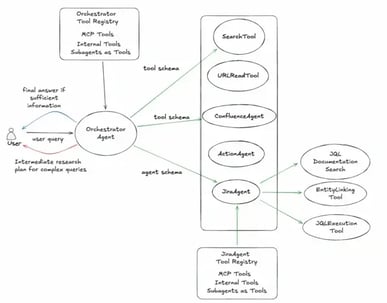
In a traditional retrieval-and-answer AI, adding more and more tools or capabilities can start to confuse the agent and lead to mistakes. Rovo Chat avoids this pitfall by organizing its AI agents into hierarchical layers. At the top, a central orchestrator agent receives your question and decides on the game plan: which specialized sub-agent should handle which parts of the task. Each sub-agent is like a domain expert focusing on a specific area, whether it’s documentation, Jira issues, Confluence pages, or something else.
This hierarchical structure makes the system more reliable. The top-level orchestrator doesn’t try to directly use dozens of different tools itself; instead, it delegates to the appropriate “expert” agent. For example, if your query is about a Confluence page, the orchestrator will engage the Confluence agent, which knows exactly how to search and retrieve pages. If the query is about Jira, it will call on the Jira agent, and so on. Each agent is defined around a domain of functionality, concentrating all its attention on one category of problems. This specialization means it can use domain-specific logic and instructions to really excel at those tasks.
Another benefit of this layered approach is that it isolates changes. Atlassian can introduce a new tool or agent for a certain domain without risking side effects on others. If they add a new Bitbucket code search agent tomorrow, it slots into the orchestration as its own expert module. The rest of the system remains unaffected. This is similar in spirit to how some modern search engines work, narrowing down results through hierarchical filtering. In short, hierarchy in Rovo Chat’s brain ensures the right expert is working on the right job, leading to better precision and easier scalability as new capabilities are added.
Specialized Domain Agents in Action
To understand how domain-specific agents improve Rovo Chat, consider the Jira Agent as an example. Jira is a complex platform on its own, with a query language for searching issues that lets you filter issues by assignee, project, status, priority, and more. A general AI might know a little about Jira from its training data, but giving Rovo Chat a dedicated Jira agent with specialized knowledge dramatically boosts its performance on Jira-related queries.
-
Jira Agent example: Rovo Chat includes a sub-agent that specializes in everything Jira. When your query involves Jira issues or projects, the orchestrator hands that part of the query to this Jira agent. The Jira agent is tuned with instructions specifically for Jira context and understands how to interpret natural-language questions into JQL filters and operations.
-
Domain expertise: Because the Jira agent focuses solely on Jira tasks, it can achieve higher accuracy. The top-level AI doesn’t need to recall the intricacies of Jira syntax itself; it simply delegates. The Jira agent knows how to search Jira tickets efficiently and what details to look for. Atlassian has equipped this agent with custom instructions and even its own mini-toolkit. For instance, it has a JQL Documentation Search tool to quickly reference Jira’s query syntax, a JQL Execution tool to run queries and fetch issue data, and an Entity Linking helper to match names (like a person’s name) to the correct user IDs or project keys in Jira. These tools act like the Jira agent’s specialized instruments, helping it handle user questions about Jira with precision.
-
Handling large datasets: One powerful capability unlocked by this hierarchical setup is the ability to work with massive numbers of Jira issues seamlessly. Imagine asking, “What issues should I focus on in this project board?” for a board that contains thousands of tickets. Obviously, you can’t just dump 1,000+ issue details into an AI prompt all at once; it would overwhelm the system’s context limit. Instead, the Jira agent can intelligently process these in batches. It might run a JQL query to get all open issues, then fetch them 100 at a time, summarizing or filtering at each step. By looping through the data in chunks, the agent gradually builds a comprehensive answer (say, a summary of high-priority tasks across that board). The beauty is that this iterative, heavy lifting is confined to the Jira agent. The top-level orchestrator doesn’t get bogged down by Jira-specific logic or giant data loads; it simply waits for the Jira agent to report back with insights. This design ensures that even huge data volumes can be analyzed by Rovo Chat, all without confusing the primary agent or running out of memory.
-
Focused integration: Because all Jira-specific behavior is neatly packaged within the Jira agent, it keeps the overall system clean and focused. When Atlassian updates how Jira queries work or adds new Jira features, they only need to update that one agent’s knowledge and tools. Other parts of Rovo Chat remain unaffected by the change. This modular approach means Rovo Chat can keep expanding its domains without turning into a tangled mess, each domain expert is a self-contained unit that plugs into the orchestration.
Built‑In System Tools
Not every user request requires the firepower of a full domain-specific agent. In some cases, Rovo Chat can solve your query with a single direct tool, no complex reasoning or multi-agent collaboration needed. For these simpler tasks, Atlassian built a set of system tools available right at the top-level orchestrator. If the AI determines your question is straightforward, it can invoke one of these tools immediately, bypassing the whole agent hierarchy for the sake of efficiency.
A few key system tools include:
-
Search: Performs a natural language search across your enterprise knowledge base (and even the web, if needed) to find relevant information. For example, if you ask “Who is the CEO of our company?”, Rovo Chat can use the Search tool to quickly look up the CEO’s name from an internal directory or public source, then give you an answer in seconds.
-
UrlRead: Fetches and reads the contents of a URL that you provide in your query. If you paste a link and ask, “What is this page about?”, Rovo Chat’s orchestrator can call UrlRead to grab the page’s text and then summarize or answer questions about it. This saves you from clicking the link and parsing it yourself; the AI does it for you on the fly.
-
People: Looks up information about a person within your organization by translating a name into the relevant user profile or ID. For instance, if you type “Who is Joe?” in a company context, the People tool might match “Joe” to a full name in your corporate directory and pull up Joe’s title or team info. It essentially bridges natural language to your company’s people data.
These system tools allow Rovo Chat to handle quick fact-finding and simple queries with minimal overhead. The smart part is that the AI will decide when to use a single tool directly versus when to engage a more elaborate multi-agent plan. If it’s a simple question, you get your answer faster because the orchestrator skips unnecessary steps. This adaptive approach means Rovo Chat can be both lightweight and heavy-duty, depending on what the situation calls for.
Three Modes of Reasoning
Now that Rovo Chat’s brain has both individual tools and specialized agents at its disposal, the AI’s first job is to decide how to answer your question. Depending on the complexity of the query, Rovo Chat will enter one of three reasoning modes, each with a different balance of speed vs. depth:
-
Brainstorming mode: For straightforward questions or open-ended creative prompts, Rovo Chat may not need to use any external tools at all. In this mode, the AI relies purely on its built-in knowledge to generate a response. Because it doesn’t have to call any tools or look anything up, the answer comes back almost instantly. This mode is great for queries like “Give me some ideas for team celebration events” or “Explain the difference between Kanban and Scrum”, essentially, things the AI can handle with general knowledge and reasoning alone, with very low latency.
-
Tool-assisted Q&A mode: Many queries benefit from a quick tool call before answering. In this mode, Rovo Chat will make a single layer of tool requests in parallel, gather the results, and then respond. There might be a slight pause while the tools do their work, but the delay is usually small. This mode is common for factual questions or requests that refer to current data. For instance, if you ask “Is our network down right now?” Rovo Chat might use a Statuspage API tool to check current system status and then reply. Or if you ask “How many open high-priority bugs do we have?”, it could quickly query Jira and then give the answer. You might notice a short wait as it searches, but it’s optimized to do all necessary lookups in one go before answering.
-
Multi-step reasoning mode: This is the most complex mode, used for questions that require multi-step problem solving and chaining together several actions. Here, Rovo Chat effectively plans out a small strategy to tackle the query. It might start by outlining a series of steps in plain language, then execute them one by one. Each step can involve calling a tool or a sub-agent, then using that result to inform the next step. For example, consider a question like, “Find all unresolved support tickets about login issues filed this month, then tell me which ones should be prioritized and assign them to the support team.” Answering this involves multiple tasks: searching tickets with a certain keyword, filtering by date and status, analyzing which are high priority, and then updating their assignees. Rovo Chat in reasoning mode might break this down into parts, do each part, and only then produce a final answer summarizing what it did. This mode takes longer and you might see the assistant “thinking” or working through steps, but it allows the AI to handle very sophisticated requests that go well beyond a single lookup. In fact, when Rovo Chat goes into this mode, it will often explain its plan as it proceeds. Sharing the plan not only helps the AI stay on track, but also gives the user transparency into a complex operation. While the latency is higher here, the trade-off is that you can ask Rovo Chat to do a lot more in one go.
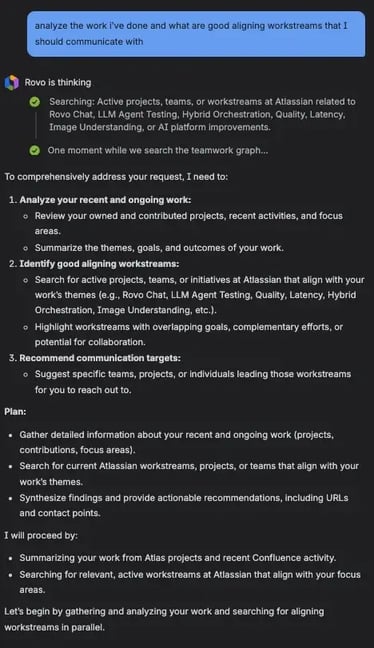
The clever part is Rovo Chat can fluidly switch between these modes. If no tools are needed, it stays simple. If one search will do, it goes for it. If your request is a head-scratcher, it’s not afraid to slow down and reason it out step by step. This adaptive reasoning ensures that you always get the answer in the most efficient way possible for the task at hand.
Evolution of Rovo Chat’s Orchestration
The current hybrid multi-agent system in Rovo Chat is the result of extensive experimentation. Atlassian’s engineers tried a few different approaches over time to find the optimal balance of flexibility and reliability. Understanding this evolution gives context to why the hybrid model was necessary.
Initial single-agent approach: In earlier versions, Rovo Chat was essentially one big agent with a toolbox of functions. All possible tools (search, retrieve, update, etc.) were available at the top level. The team even trained intent classifiers to help the agent pick the right tool for a query, trying to prevent it from making obviously wrong tool choices. This setup worked for simpler use cases, but it was very static. Each query followed a similar pattern, and as queries grew more complex, the single-agent often hit a wall. It wasn’t easy for one agent to handle wildly different tasks or to incorporate many tools without confusion. The system lacked the adaptability needed for the variety of questions users could throw at it.
The move to a graph-based planner: To push Rovo Chat’s capabilities further, the team experimented with a more planful multi-agent orchestration. They introduced a planning phase where the AI would break a user’s query into a directed acyclic graph (DAG) of subtasks. Each node in this graph represented a subtask or an agent action, and arrows indicated the sequence. Based on that plan, the orchestrator would call the appropriate sub-agents in a particular order, passing information from one to the next as needed. This approach was innovative because it treated the language model almost like a project manager: given a question, the model would draft a whole game plan in natural language (not constrained by a rigid function call format), deciding which agents should do what and in what order. Complex queries naturally resulted in longer plans, whereas simple questions produced a trivial plan. They even had special “Think” and “Answer” agents in the graph, which allowed the system to insert reflection steps or final answer synthesis as explicit parts of the plan. Importantly, this graph orchestrator also allowed a direct answer shortcut, if the planner decided no external tools were needed, it could jump straight to the Answer step and respond immediately, saving time.
This graph-based multi-agent orchestration was a big step toward a hierarchical system, and it worked well in many cases. Rovo Chat became capable of more nuanced multi-step reasoning by chaining specialized agents together according to the plan. However, this design revealed some new challenges. The biggest issue was rigidity: if the AI’s initial plan wasn’t perfect the system had trouble recovering gracefully. Re-planning mid-stream is hard, especially when the original plan was made with limited information. In other words, planning an entire complex conversation or operation from just the user’s question proved to be brittle. Reality often deviated from the blueprint. The team realized that while the graph approach gave fine-grained control, it might require a more advanced learning strategy. But that would be a longer-term research effort. So, how do you get the benefits of multi-agent orchestration without the downsides of an over-planned system? The answer was to take a hybrid approach.
The Hybrid Orchestrator Model
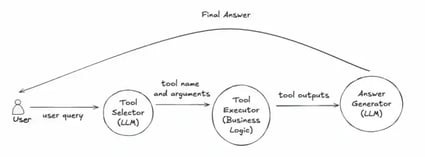
Atlassian ultimately settled on what they call a Hybrid Orchestrator for Rovo Chat, a design that blends structured planning with flexible, step-by-step decision making. Rather than constructing a full task graph in advance, the hybrid model works in a dynamic loop. The top-level LLM-based orchestrator still serves as the conductor, but instead of writing out the entire symphony upfront, it decides the next best action one step at a time based on the latest information available.
Here’s how the hybrid orchestration works in practice: when a query comes in, the orchestrator generates a schema or list of potential sub-agents and tools that might be useful. It then picks the most relevant one and executes that action. After getting the result, it re-evaluates the situation and decides on the next step, and so on. This loop continues until the orchestrator decides it has enough to produce a final answer. In essence, it’s planning and doing simultaneously in small increments an approach often closer to how humans tackle problems.
The hybrid part of the name comes from mixing direct tool use and agent delegation fluidly. Sometimes the next step might be calling a simple tool, other times it might be invoking a whole sub-agent. The orchestrator remains in control, constantly choosing the path that seems most efficient at that moment. This design turned out to be much more robust than the fully graphed plan. If one step yields an unexpected result, the system can adjust the subsequent steps on the fly. There’s no brittle predetermined sequence that might fall apart; it’s more of an improvisation within a structured framework.
The benefits of the hybrid orchestrator have been significant. It simplified the complexity of the orchestration logic, making it easier for Atlassian’s developers to maintain and extend. When other Atlassian teams want to add new capabilities or integrate their own agents into Rovo Chat, they can do so without grappling with a global planning algorithm, they just provide a new agent and let the orchestrator figure out when to use it. The hybrid model essentially democratized the platform for expansion across the company’s products. And from the user’s perspective, it finds the answer through the shortest reliable path, avoiding unnecessary detours. If two tools are needed it will use two, if none are needed it will use none. This dynamic efficiency is a major upgrade over both the old single-agent and the overly rigid graph approach.
Performance Improvements with Multi‑Agent Orchestration
Moving to the hierarchical multi-agent framework didn’t just expand what Rovo Chat could do; it also made it do things better and faster. Atlassian benchmarked the new system against the old setup, and the results were very encouraging:
-
More accurate answers: By delegating tasks to domain experts and using tools smartly, the multi-agent Rovo Chat was able to provide correct answers more often. In fact, Atlassian saw the accuracy of responses increase by roughly 3–4% compared to the original single-agent approach. That may sound like a small jump, but in the context of answering a wide array of real-world questions, it means a lot more users getting the info they need on the first try without rephrasing or clarifying their query. Every percentage point improvement here reflects numerous answered questions that would have previously been mishandled or misunderstood.
-
Faster response times: One of the most noticeable benefits for users is speed. The hybrid orchestration introduced features like the direct answer mode, which allows Rovo Chat to skip tool usage entirely when it’s not needed. Thanks to that, a significant portion of queries now get answers much faster than before. For example, trivial questions that the AI can handle directly might show an answer almost 70% quicker than they did under the old system. Even for more moderate queries that do require a tool or two, the response often comes back faster because the orchestrator avoids redundant steps and calls only what it truly needs. The median time for Rovo Chat to start answering dropped substantially. And in complex cases that previously were slow, the new system still managed to trim down the wait by about 20%. In practice, this means users spend less time staring at a “thinking…” message and more time acting on information.
-
Better user experience for all query types: The combination of direct answers for simple questions and intelligent multi-step reasoning for hard ones means that Rovo Chat feels snappier and more capable at the same time. Quick questions don’t get caught up in unnecessary processing, and tough questions are handled more gracefully without timing out or erroring out as often. The improvement in first-token latency especially contributes to a smoother chat experience, the conversation flows without awkward long pauses. By executing tool calls in parallel when possible and eliminating the heavy upfront planning, the system keeps the interaction moving at a comfortable pace.
These performance gains boil down to Rovo Chat doing the right amount of work for each query. Nothing more, nothing less. If a job can be done with one lookup, it does just one. If a job needs ten steps, it takes them, but intelligently. As a result, users have a more seamless experience getting accurate answers quickly, whether their question was a no-brainer or a head-scratcher.
Wrapping Up
The evolution of Rovo Chat into a hierarchical multi-agent system marks an exciting leap forward for Atlassian’s AI assistant. By orchestrating multiple specialized agents, Rovo Chat has become significantly more powerful and efficient at helping teams get answers and get work done. It can break down and conquer complex requests that would have stumped its earlier self, all while delivering responses faster than before on everyday questions. This kind of multi-agent orchestration is at the forefront of enterprise AI innovation, it shows how carefully combining the strengths of different AI components can lead to a sum greater than its parts. Atlassian’s journey with Rovo Chat doesn’t stop here. The multi-agent framework opens the door to plenty of promising directions. We can expect to see even more specialized agents, smarter planning strategies, and continuous learning from interactions to further enhance Rovo Chat’s intelligence. All of these advancements have a single goal: to better empower teams like yours to deliver outstanding work, with an AI partner that truly understands and supports your goals.
Read next.
Non-Human Identities in Atlassian Cloud: Service Accounts, Tokens, Apps, and Agents
How to govern non-human identities in Atlassian Cloud: service accounts, API tokens, Forge apps, and Rovo agents, each with an owner, scope, and expiry.
October 1, 2026How to Choose an Atlassian Partner for a Jira Cloud Migration
How to choose an Atlassian Solution Partner for a Jira Cloud migration: what to verify, eight questions to ask, red flags, and a shortlist scorecard.
September 30, 2026The Complete Guide to Agent Readiness in Atlassian Cloud
Agent readiness for Atlassian Cloud: the five checks to run before you switch on Rovo agents, from identities and permissions to the off switch.
September 28, 2026How to Review Rovo Agent Access in Jira and Confluence
A step-by-step access review for Rovo agents in Jira and Confluence: who can create them, who can use them, what they can change, and what gets logged.
The blog, weekly.
One email a week with what we published. No drip sequence, and you can leave in a click.