

Web Search in Rovo Agents: What It Is and How to Use It
See how web search in Rovo Agents works, how to set it up, and how teams are using it to bring live web context into their workflows.

contents
Rovo Agents are already powerful when it comes to internal knowledge. They can search across Confluence pages, Jira tickets, meeting notes, and connected third-party tools to surface answers, summarize context, and take action inside your Atlassian environment. For questions about your team's work, your company's processes, or your project history, a well-configured Rovo Agent is one of the most capable tools available.
But not every question can be answered from inside your organization. Sometimes a team needs to know what a competitor announced last week. Sometimes a developer needs the latest documentation for a third-party API that gets updated regularly. Sometimes a market research agent needs current industry data to supplement the internal analysis it is building. Internal knowledge alone cannot answer those questions accurately or reliably.
That is the gap Web Search in Rovo Agents is designed to close. It gives Rovo Agents the ability to browse the live web securely, bringing outside context into your Atlassian workflow without requiring a separate research tool or manual copy-pasting from browser tabs.
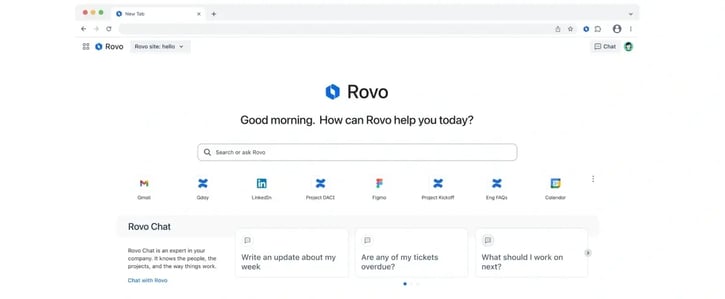
What Is Web Search in Rovo Agents
Web Search is a knowledge source that can be enabled for individual Rovo Agent scenarios. When it is turned on, the agent can fetch live information from public websites to supplement its internal knowledge. This goes beyond a basic search engine result. The agent uses web search as a tool to verify facts, find external references, pull in up-to-date documentation, and bring outside context directly into the response it delivers.
The key distinction is that Web Search is configured at the scenario level, not at the agent level globally. This means teams can build highly specialized agents that know exactly when to look outside the organization and when to stay strictly internal. A Market Research agent can have web access enabled. An Internal Policy agent can have it disabled entirely. Each scenario is configured independently based on what that agent actually needs to do its job well.
Web Search also operates consistently across every surface where Rovo Agents are used. Whether the agent is being accessed in Rovo Chat, triggered via a Jira Automation rule, or invoked inside the Confluence editor, the web search behavior follows the scenario configuration. There is no inconsistency depending on where the agent is called from.
How It Works: The Technical Setup
Setting up Web Search for a Rovo Agent is straightforward, but there are two layers of control that need to be in place before it can be used.
Organization-level enablement
Before any agent can use Web Search, the organization administrator must enable it in Atlassian Adminhub. This is the top-level control that governs whether web access is available to agents across the organization at all. If an admin has disabled Web Search for the organization, no agent will be able to access the live web regardless of how individual scenarios are configured. This ensures that organizations with strict data governance policies can keep all agent activity strictly internal.
Scenario-level configuration
Once web search is enabled at the organization level, individual agents can be configured to use it at the scenario level. To enable it, navigate to the Agent Configuration page, select the relevant scenario, and toggle on Web Search under the Knowledge section.
This two-tier control model means organizations have full governance over which agents access the web and under what conditions, while still giving teams the flexibility to build web-connected agents for the scenarios where external data genuinely adds value.
Practical Use Cases for Web Search in Rovo Agents
Web Search opens up a category of agent use cases that simply were not possible when agents were limited to internal knowledge. Here are the most practical and immediately valuable scenarios.
Market research and competitive intelligence
Marketing, product, and strategy teams regularly need to track what competitors are doing, what industry analysts are saying, and what trends are emerging in their market. Without web search, this work happens manually in browser tabs that never connect back to the internal systems where decisions get made.
A web-connected Rovo Agent can be configured as a dedicated market research assistant. Team members can ask it to summarize a competitor's recent product announcements, pull the key points from a new industry report, or find what analysts are saying about a specific market segment. The agent brings that information back into Confluence or Jira where it can be connected to the internal strategy work it is meant to inform.
Third-party API and integration documentation
Development teams frequently work with third-party APIs, libraries, and services whose documentation changes regularly. Keeping an internal copy of external documentation up to date is impractical. Asking the agent about a library version from six months ago produces outdated answers.
A web-connected agent configured for development support can pull the latest documentation for a third-party service in real time. When a developer asks how a specific endpoint works or what the current rate limits are for an external API, the agent fetches the current information rather than relying on documentation that may have been superseded.
Real-time news and industry monitoring
Teams that need to stay informed about regulatory changes, industry news, or technology developments can use web-connected agents to monitor and summarize relevant information on demand. Instead of manually scanning news sources or setting up separate alerting tools, a team member can ask the agent to summarize recent developments in a specific area and receive a structured response that surfaces the most relevant information.
Fact-checking and source verification
When teams are producing external-facing content, drafting proposals, or building business cases, accuracy matters. A web-connected agent can be used to verify claims, check statistics, and find authoritative sources before content is finalized. This reduces the risk of outdated or inaccurate information making its way into published materials.
Onboarding support for tools and technologies
New team members frequently need to get up to speed on technologies, tools, or frameworks that the organization uses. A web-connected onboarding agent can answer questions about external tools, pull current documentation, and provide context that goes beyond what is stored internally, making the onboarding experience more comprehensive without requiring senior team members to field every question manually.
Supporting product teams with external benchmarks
Product managers and UX researchers often need to benchmark their product's capabilities or performance against what is available in the market. A web-connected agent can help surface publicly available benchmarks, feature comparisons, and user feedback about competing products, giving product teams an informed starting point for strategic discussions.
Benefits of Web Search in Rovo Agents
More accurate and current answers: Internal knowledge has a shelf life. Documentation gets outdated. External tools release new versions. Market conditions shift. Web Search ensures that agents are drawing on current information when the question requires it, rather than surfacing answers that may no longer be accurate.
Fewer tools in the workflow: Before Web Search, teams using Rovo Agents for research workflows had to supplement the agent's answers with manual browser research, then manually bring that information back into Confluence or Jira. Web Search collapses that process into a single interaction, reducing the number of context switches in a research workflow.
Granular control without sacrificing flexibility: The scenario-level configuration model means organizations do not have to choose between giving all agents web access or none. Teams can enable web search precisely where it adds value and keep it disabled where internal-only responses are preferred or required by policy.
Consistent behavior across surfaces: Because web search behavior follows the scenario configuration rather than the surface where the agent is accessed, teams can rely on consistent responses whether they are using the agent in Chat, in Confluence, or in an automated workflow.
Richer agent capabilities for specialized workflows: Web Search significantly expands what is possible when building custom agents in Rovo Studio. Agents that previously would have required manual input to stay current can now maintain accuracy independently by fetching the latest information when it is needed.
What to Keep in Mind
Web Search works best when agents are given clear instructions about when to use it. In the scenario configuration, teams can specify that the agent should use web search for certain types of questions while relying on internal knowledge for others. This prevents agents from defaulting to web search unnecessarily on questions that internal knowledge can answer more accurately.
The quality of web search results also depends on how well the agent's scenario is designed. Agents with a clearly defined purpose and well-written instructions will use web search more effectively than broadly configured agents with vague instructions. Treating each scenario as a specific job with a specific knowledge strategy produces the best results.
Organizations should also be aware that if an admin has not yet enabled Web Search in Atlassian Adminhub, the option will not appear in the agent's scenario configuration. Enabling web access is an admin-first action before any team-level configuration can take place.
Availability
Web Search in Rovo Agents is available to organizations on Atlassian Cloud Standard, Premium, and Enterprise plans with Rovo enabled. Organization administrators must enable Web Search in Atlassian Adminhub before individual agents can be configured to use it. Once enabled at the org level, any agent creator can toggle it on for specific scenarios in the Agent Configuration page under the Knowledge section.
How Atlas Bench Can Help
Atlassian is moving fast. Rovo is evolving from a search and chat tool into a fully agentic platform, with new capabilities like Web Search, MCP integrations, partner agents, and Rovo Dev expanding what teams can build and automate inside their Atlassian environment. Each new capability creates new opportunities for teams that are well positioned to take advantage of them and new complexity for teams that are not yet set up to do so.
Atlas Bench helps organizations stay ahead of that curve. As an Atlassian Platinum Solution Partner, we help teams implement, configure, and optimize their full Atlassian environment, from foundational Jira and Confluence setup to advanced Rovo agent configuration and automation strategy. Whether you are exploring Rovo for the first time, looking to build web-connected agents for your team, or trying to get more value from the Atlassian tools you already have, our Certified Atlassian Experts are here to help.
Read next.
Non-human identities in Atlassian Cloud, explained
How to govern non-human identities in Atlassian Cloud: service accounts, API tokens, Forge apps, and Rovo agents, each with an owner, scope, and expiry.
October 1, 2026How to choose an Atlassian partner for a Jira migration
How to choose an Atlassian Solution Partner for a Jira migration to Cloud: what to verify, eight questions to ask, red flags, and a shortlist scorecard.
September 30, 2026The complete guide to agent readiness in Atlassian Cloud
Agent readiness for Atlassian Cloud: the five checks to run before you switch on Rovo agents, from identities and permissions to the off switch.
September 28, 2026How to review Rovo agent access in Jira and Confluence
A step-by-step access review for Rovo agents in Jira and Confluence: who can create them, who can use them, what they can change, and what gets logged.
The blog, weekly.
One email a week with what we published. No drip sequence, and you can leave in a click.