

New Work Types in Jira Business Spaces
Learn how Jira's new work type hierarchy in business spaces gives non-technical teams better structure, and control over their work.

contents
Jira has long been the go-to tool for software and IT teams managing complex workflows. But over the past few years, Atlassian has been steadily expanding Jira's capabilities for non-technical teams as well, recognizing that marketing, HR, finance, and operations teams have project management needs that are just as complex, even if the nature of the work looks very different.
Business spaces in Jira were designed with those teams in mind. They provide a dedicated environment for non-technical work, with templates and structures that reflect how business teams actually operate rather than forcing them into a software development framework.
The latest update to business spaces takes that a step further. Atlassian has introduced new work types that sit above the standard task level, giving teams a higher-level parent structure that reflects their specific type of work. For a marketing team, that might be a Campaign. For a project management team, it might be a Workstream. The result is a cleaner, more intuitive hierarchy that makes it easier to organize, track, and manage complex work across teams.
This article explains what the change means, who it affects, and how teams can use it effectively.
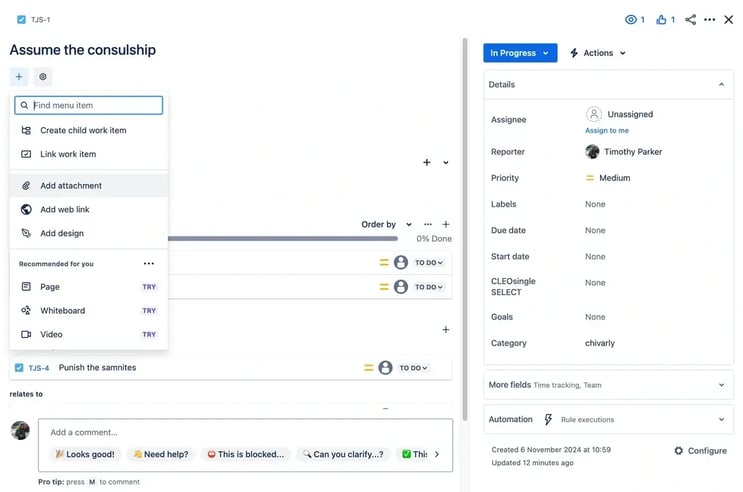
What Are Jira Business Spaces
Before diving into the new work types, it helps to understand what business spaces are and how they differ from other Jira spaces.
When you create a new space in Jira, you choose a template that determines the structure and work types available in that space. Templates fall broadly into two categories. Software and IT templates are designed for development and service management teams, with structures like sprints, epics, and issues that reflect agile delivery workflows. Business templates are designed for non-technical teams, with structures that reflect work management use cases like campaign management, project tracking, HR processes, and financial planning.
A business space is any Jira space created using one of these business templates. The underlying product is still Jira, but the space is tailored to the needs of a business team rather than a software team. This means the terminology, work item types, and default structures are designed to feel intuitive to someone who has never used Jira for software development.
Business spaces are used by teams across marketing, HR, finance, legal, operations, and any other function that needs a structured way to manage and track work without needing the full complexity of a software delivery workflow.
Team-Managed vs Company-Managed Business Spaces
Jira business spaces come in two management types, and it is worth understanding the difference because the new work types have rolled out to one before the other.
Team-managed spaces
These are spaces that individual teams can set up and configure themselves without requiring a Jira administrator. They are simpler to create and manage, with configuration options available directly within the space. Teams can adjust their own workflows, work types, and settings without raising a request with the admin team. This makes them a popular choice for smaller teams or teams that want the flexibility to manage their own Jira environment.
Company-managed spaces
These are spaces configured and maintained by a Jira administrator. They offer more advanced configuration options, tighter governance, and the ability to share schemes and settings across multiple spaces. For larger organizations with complex Jira environments, company-managed spaces are typically the standard because they allow administrators to maintain consistency and control across the entire Jira instance.
The new work types described in this article have currently rolled out to team-managed business spaces. Atlassian has confirmed that company-managed business spaces are coming soon. Organizations using company-managed spaces should watch for the update and plan to configure the new work type hierarchy when it becomes available for their space type.
What Has Changed: The New Work Type Hierarchy
Previously, work in Jira business spaces was organized primarily at the task and subtask level. There was no parent work type sitting above tasks to group and organize related work at a higher level. This meant that teams managing complex, multi-part projects had to use workarounds to create that higher-level structure, which often resulted in messy spaces that were hard to navigate and report on.
The new update introduces a top-level work type that sits above tasks in the hierarchy. This work type is specific to the business template used to create the space, which means its name and framing reflect the actual language that team uses for their work rather than generic software development terminology.
The hierarchy now looks like this depending on the template:
For a space created using the project management template:
- Workstream
- Task
- Subtask
For a space created using the campaign management template:
- Campaign
- Task
- Subtask
It acts as a parent container for related tasks, allowing teams to group work together under a meaningful label that reflects what that work is actually about. Multiple tasks can live under a single Campaign or Workstream, and subtasks can sit under individual tasks as they always have.
This is not just a cosmetic change. It is a structural one that gives business teams the same kind of hierarchical organization that software teams have had for years, expressed in language that makes sense for how they work.
How It Works in Practice
To understand the practical value of the new work type hierarchy, it helps to look at how a real team might use it.
Marketing team using the campaign management template
A marketing team managing a product launch campaign might structure their Jira space like this:
- Campaign: Q3 Product Launch
- Task: Draft campaign brief
- Task: Design email templates
- Task: Write landing page copy
- Task: Set up paid media targeting
- Task: Schedule social posts
- Task: Coordinate PR outreach
All of these tasks belong to the same campaign and can now be grouped under it as child work items. The team gets a clear view of everything associated with the Q3 Product Launch in one place, with progress visible at both the task level and the campaign level. When stakeholders want to know how the campaign is progressing, they can look at the Campaign work item and see the state of all the tasks underneath it without having to filter through the full task list.
Operations team using the project management template
An operations team managing a series of process improvement initiatives might structure their space like this:
- Workstream: Procurement Process Redesign
- Task: Audit current procurement workflow
- Task: Interview key stakeholders
- Task: Map the new process
- Task: Build approval documentation
- Task: Train the procurement team
Again, all of the tasks related to this initiative are grouped under the Workstream parent, making it easy to see what the initiative contains, who owns each piece, and where it stands overall.
Customizing Work Type Names
One of the more flexible aspects of this update is that work type names are not fixed. Teams can rename the top-level work type in their space settings to whatever label makes the most sense for their work. This is the same functionality that already exists in software spaces, where teams can rename epics and other work types to match their terminology.
For example, a legal team using the project management template might rename Workstream to Matter. An HR team might rename it to Initiative. A finance team might use Program. The underlying structure and behavior remain the same regardless of the name, but the label can be tailored to fit the team's language and context.
To change the name, navigate to the space settings and update the work type name from there.
Why This Matters for Non-Technical Teams
The introduction of a higher-level work type in business spaces addresses one of the most consistent pain points for non-technical teams using Jira. Without a parent work type, large projects became unwieldy lists of tasks with no clear grouping or hierarchy. Teams either created workarounds using labels or components, which are imperfect substitutes, or they accepted that their Jira space would be harder to navigate as the work scaled.
The new work type hierarchy solves this in a few important ways.
Greater flexibility in how work is organized
Teams can now structure their work in a way that reflects the actual shape of their projects rather than forcing everything into a flat list of tasks. Different types of work can be grouped under different parent work items, making the space easier to navigate and manage as complexity grows.
Improved visibility into progress
With a parent work type in place, teams and stakeholders can see progress at multiple levels. A program manager can look at the Campaign or Workstream level to get a high-level view of where things stand, then drill down into individual tasks to see the details. This makes reporting more meaningful without requiring manual status updates or separate tracking documents.
More intuitive for non-technical users
One of the biggest barriers to Jira adoption among non-technical teams is terminology that feels foreign. Asking a marketing manager to create an epic feels counterintuitive. Asking them to create a Campaign feels natural. By using template-specific language for the new work type, Atlassian makes the structure immediately understandable to someone who has never worked in a software development environment.
Better collaboration across teams
When work is clearly organized under meaningful parent items, it becomes easier for team members to understand where their tasks fit within the broader project, how their work connects to what others are doing, and what the overall progress looks like. This reduces the coordination overhead that comes from unclear work structures.
Availability
The new work types are currently available for team-managed business spaces in Jira Cloud. Company-managed business spaces are confirmed to be coming soon. The update is available to all license levels, meaning teams on Free, Standard, Premium, and Enterprise plans can access the new work type hierarchy in their team-managed business spaces without any additional cost or plan upgrade.
How Atlas Bench Can Help
Atlas Bench helps organizations get the most out of their Atlassian environment. Whether you are setting up Jira business spaces for non-technical teams for the first time, migrating from another project management tool, optimizing an existing Jira configuration, or looking to roll out Jira consistently across multiple business functions, our Certified Atlassian Experts have the experience to help you build a setup that works.
Atlassian continues to invest heavily in making Jira a more powerful and accessible tool for teams across every function, not just software and IT. Updates like the new business space work types are part of a broader shift toward a connected, organization-wide system of work. Getting the right foundation in place now means your teams are positioned to take advantage of every improvement as it arrives.
Read next.
Non-human identities in Atlassian Cloud, explained
How to govern non-human identities in Atlassian Cloud: service accounts, API tokens, Forge apps, and Rovo agents, each with an owner, scope, and expiry.
October 1, 2026How to choose an Atlassian partner for a Jira migration
How to choose an Atlassian Solution Partner for a Jira migration to Cloud: what to verify, eight questions to ask, red flags, and a shortlist scorecard.
September 30, 2026The complete guide to agent readiness in Atlassian Cloud
Agent readiness for Atlassian Cloud: the five checks to run before you switch on Rovo agents, from identities and permissions to the off switch.
September 28, 2026How to review Rovo agent access in Jira and Confluence
A step-by-step access review for Rovo agents in Jira and Confluence: who can create them, who can use them, what they can change, and what gets logged.
The blog, weekly.
One email a week with what we published. No drip sequence, and you can leave in a click.