

Atlassian Migrated the Jira Database Platform to AWS
Atlassian successfully migrated 4 million Jira databases to AWS Aurora with minimal downtime while achieving major gains in performance.

Atlassian recently faced a daunting challenge: migrating four million Jira customer databases to the AWS Aurora cloud database service, all while minimizing disruption to users. This project promised big payoffs in reliability, performance, and cost efficiency, but executing it at such an enormous scale required careful planning and innovative solutions. In this blog post, we explore how Atlassian tackled this massive migration. We delve into the technical challenges, key strategies, and outcomes of this ambitious transformation, and discuss what organizations can learn from it.
The Challenge: Migrating Databases at Massive Scale
Migrating a database without users noticing is tough in any scenario. Atlassian needed to do it millions of times. Jira’s architecture uses a separate PostgreSQL database for each customer, or tenant, to ensure strong data isolation and scalability. With four million Jira tenants, there were four million databases spread across roughly 3,000 database instances in 13 AWS regions worldwide. Most Jira customers share database instances on AWS RDS for PostgreSQL, while a handful of very large customers are on dedicated AWS Aurora PostgreSQL instances. Under normal operations, Atlassian routinely shifts around 1,000 databases per day between servers to balance load, and customers never notice these background migrations. But moving the entire fleet of four million databases to Aurora in a short time frame would be a task of unprecedented scale.
The goal was clear: achieve a seamless migration with minimal downtime or performance impact. Atlassian aimed to re-platform all remaining Jira databases from RDS to Aurora to unlock major improvements in cost, reliability, and performance. The challenge was how to execute this change across millions of databases efficiently, safely, and transparently to users.
Why Switch to AWS Aurora?
Migrating the Jira databases to AWS Aurora PostgreSQL offered several compelling benefits for Atlassian’s cloud platform:
-
Improved Cost Efficiency: Aurora’s architecture lets you use a cluster of database nodes, with one writer and multiple readers. This meant Atlassian could run smaller instance types but leverage multiple nodes, cutting the per-instance size roughly in half without sacrificing capacity. More instances translated to lower infrastructure costs for the same workload.
-
Higher Reliability: Aurora comes with a 99.99% uptime SLA, compared to 99.95% for standard RDS. It also replicates data six ways across availability zones, providing better resilience. By moving to Aurora, Atlassian could boost the database uptime and fault tolerance for Jira Cloud.
-
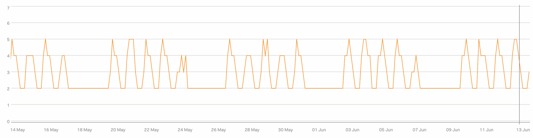
Scalability and Performance: With Aurora, Atlassian can auto-scale read replicas up to 15 nodes to handle spikes in demand. In the old RDS setup, only the primary instance was handling all reads and writes, limiting throughput. Now, multiple Aurora reader instances share the read load, improving performance during peak hours. During off-peak times, those extra instances automatically shut down, maintaining snappy performance while optimizing resource usage.
-
Unified Platform: Atlassian’s largest Jira tenants were already on Aurora due to their hefty resource needs. Migrating the rest of the customers’ databases to Aurora unified the platform onto one technology, simplifying operations. Engineers can focus on one type of database system, Aurora, instead of juggling both RDS and Aurora configurations.
Strategic Migration Design
To accomplish this migration in a matter of months, Atlassian’s engineers devised a strategy that balanced speed and safety. The migration design centered on converting each RDS database instance into an Aurora cluster, one by one. The process for each instance followed two main steps:
-
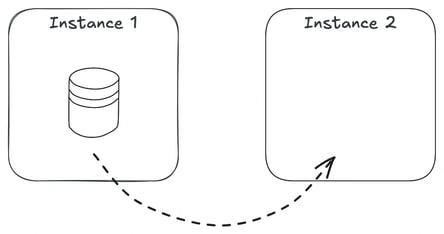
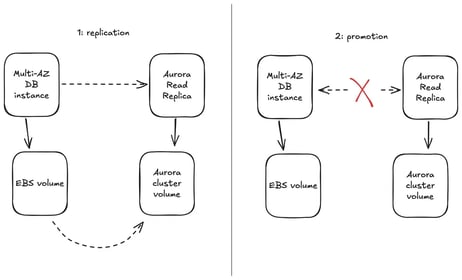
Replication to Aurora: They first added an Aurora read replica to the existing RDS PostgreSQL instance. This is a built-in capability of AWS RDS that allows you to replicate data from an RDS PostgreSQL instance to a new Aurora PostgreSQL cluster volume. The read replica continuously synchronized all databases on the source instance over to the new Aurora storage layer in the background.
-
Cutover to Aurora: Once the replica had fully caught up with the source data, Atlassian performed a controlled cutover. They “promoted” the read replica, turning it into a standalone Aurora database cluster independent of the original RDS instance. At this moment, all the databases that were on the RDS instance were now officially running on the new Aurora cluster.
This two-phase 'replicate-then-promote' approach meant the heavy lifting of data copy was done ahead of time, allowing the final switchover to happen very quickly. However, executing a cutover for an instance that hosts up to 4,000 Jira databases is far from trivial. Each Jira tenant’s application servers needed to start pointing to the new Aurora cluster’s endpoint at the right moment of cutover. To ensure a seamless transition, Atlassian built automation and safeguards around the promotion process:
-
Coordinated Switch: Just before promotion, all user access to the source databases was temporarily locked. This prevented any new writes from happening on the old RDS instance at cutover time, eliminating the risk of data divergence. After the Aurora cluster became the primary source, user accounts were unlocked on the new cluster only.
-
Instant Endpoint Update: The Jira cloud application, running on hundreds of EC2 app servers, normally refreshes database connection info periodically. Waiting for that could introduce delay or inconsistencies. Instead, Atlassian used a feature flag to immediately direct each tenant’s Jira application to the new database endpoint at the exact moment of cutover. This “big switch” ensured applications were instantly connected to the Aurora databases as soon as they were live.
-
Automated Orchestration: The whole cutover sequence was orchestrated with an AWS Step Functions workflow. This automation ran pre-flight checks, synchronized the cutover steps, and included error-handling logic to safely pause or roll back if anything wasn’t right. Post-migration, the team closely monitored traffic and behavior on the new Aurora cluster for a few hours to confirm everything was operating normally.
Thanks to thorough preparation, each instance cutover completed in less than 3 minutes on average, well within acceptable downtime limits and practically unnoticeable to customers. The plan was working smoothly in testing, until an unexpected obstacle appeared.
Overcoming the File Count Hurdle
While testing the migration process on a large RDS instance, Atlassian encountered a mysterious failure. The initial data sync to Aurora had finished, but the new Aurora read replica instance refused to come online properly. AWS support identified the issue: there were simply too many files on the source database instance for Aurora to handle in one go.
Every PostgreSQL table, index, and sequence corresponds to at least one file on disk. Jira has a large number of these database objects, so each Jira database uses about 5,000 files. When thousands of these databases are hosted together on one server, the total number of files can reach into the millions. It turned out that Atlassian’s conversion process was choking on the sheer scale of objects being migrated simultaneously. The new Aurora instance was timing out during startup while trying to enumerate an enormous number of files.
The solution: drastically reduce the number of databases on a given instance and thus the number of underlying files present on it before attempting a conversion. AWS advised Atlassian to shrink the tenant count per RDS instance prior to converting it to Aurora. Since they couldn’t easily reduce how many files each database uses, the team opted to reduce the number of tenants on the instance, a tactic the engineers dubbed “draining” the instance.
In practical terms, draining meant migrating the majority of databases off of a given RDS instance elsewhere, leaving only a small number of databases behind. By doing this, the file count on that source instance would drop to a level that Aurora could handle for conversion. Importantly, once an instance had been converted into an Aurora cluster successfully, it could later take on additional databases again up to sensible limits. This way, Atlassian could “drain and refill” instances in a leapfrog fashion, minimizing the extra hardware needed at any one time during the migration.
Accelerating Migration with Automated Draining
With millions of databases to move and a short timeline, Atlassian built a highly automated migration tool to speed up the draining process. This tool supercharged their routine migration mechanism to operate at vastly higher scale:
-
Selective Tenant Moves: The draining automation analyzed all Jira tenants and prioritized moving the smallest and least active databases first. By starting with low-usage customers, they reduced the data transfer volume and minimized any performance impact during migration. Smaller databases meant faster copy times, which helped increase throughput.
-
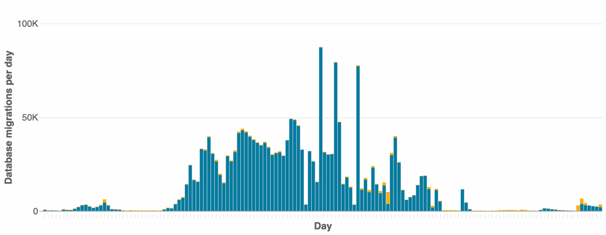
Massive Throughput: Under this system, Atlassian ramped up from migrating ~1,000 databases per day to an average of 38,000 migrations per day, peaking at nearly 90,000 in a single day. This was a huge increase in migration volume, achieved while still meeting strict reliability and uptime targets for the service.
-
Staying Organized: As soon as an RDS instance was drained to the target minimal number of databases, it was flagged for conversion to Aurora. The automation then moved on to other source instances that needed draining. Converted Aurora clusters were quickly put to use as new “destination” instances, receiving databases migrated from other RDS sources. This continuous daisy-chain approach kept the process efficient and minimized idle resources.
-
Cleanup and Reuse: After a successful cutover of an instance to Aurora, the legacy RDS instance was decommissioned automatically after a short safety period. The freed capacity was then available to be reused elsewhere in the migration pipeline.
Managing Migration at Scale
Executing this migration was as much about project management as engineering. Atlassian’s team had to carefully tune the migration rate to avoid overloading systems and ensure the customer experience remained unaffected:
-
Concurrency Controls: The team carefully managed how many migrations ran in parallel at any time. For each source RDS instance, only a limited number of database moves were allowed to happen simultaneously. This "source concurrency" limit prevented any single database server from becoming overloaded. Likewise, each Aurora cluster accepted only a certain number of incoming migrations at once. This "destination concurrency" setting ensured the target cluster’s performance remained stable. By controlling both, the engineers kept the migration invisible to users.
-
Throughput vs. Infrastructure Trade-offs: The overall migration speed in each region was largely determined by how many Aurora clusters were available as new homes for migrating databases. Simply adding more destination clusters could increase throughput, but running a lot of extra database servers would incur high cost. The team struck a careful balance, provisioning just enough temporary Aurora capacity to keep migrations flowing steadily, but not so much that resources sat idle. As soon as some RDS instances were converted to Aurora, those new clusters became destinations for other migrating tenants, keeping additional infrastructure needs low.
-
Monitoring and Adjustments: Progress was tracked with daily targets and a rolling window of actual migration rates. If a region fell behind, parameters like concurrency or the number of active target clusters were tweaked to boost throughput. Thanks to close monitoring (and plenty of tinkering), the project stayed on schedule and even finished ahead of the initial schedule.
-
Minimal User Impact: Throughout the draining and migration blitz, Jira’s services stayed within normal operating parameters. Careful controls and a gradual, region-by-region approach ensured that customers experienced no significant disruptions, even as tens of thousands of databases moved behind the scenes each day.
Results and Benefits of the Aurora Migration
After several months of non-stop migrations, Atlassian successfully transitioned the entire Jira database platform to AWS Aurora. The outcomes of this effort proved the worth of the project:
-
Seamless Transformation: The migration of four million databases was completed on time and virtually invisible to end users. Jira customers continued their work without noticing this massive backend change.
-
Significant Cost Savings: Atlassian hit its ambitious cost reduction targets. By switching to Aurora’s more efficient cluster architecture, they dramatically lowered the overall infrastructure footprint. Interestingly, the total number of database instances in use went up, since Aurora clusters use a larger number of smaller nodes, but the cost per unit of work went down. The standard instance size dropped from m5.4xlarge on RDS to r6.2xlarge on Aurora. This new Aurora instance type had roughly half the CPU cores of the old one, but similar memory capacity. With multiple Aurora nodes available, the system could deliver equal or better performance at lower cost.
-
Better Performance: Jira’s databases are now performing better, especially under peak loads. Aurora’s ability to utilize all nodes in a cluster instead of relying on a single primary instance in RDS means more CPU and I/O resources are available when demand spikes. Teams observed that during busy hours, Aurora clusters automatically scaled out read replicas to handle the load, then scaled them back in during off-peak times, maintaining snappy performance while optimizing resource usage.
-
Higher Reliability: Moving to Aurora improved the overall reliability of Jira’s database layer. The higher SLA and Aurora’s fault-tolerant design, with replication across multiple availability zones, reduce the risk of outages. Maintenance operations like failovers and backups are generally quicker and more transparent in Aurora, further minimizing any impact on customers.
-
Operational Simplicity: With all Jira tenants now on the same database technology, Aurora, instead of juggling two different systems, the platform became easier to manage and optimize. Atlassian’s DB engineers can focus on a single type of database backend, and the migration has paved the way for future improvements using Aurora’s advanced features across the entire fleet.
Wrapping Up
Migrating the Jira database platform to AWS Aurora was a bold and complex project, but it delivered clear wins in cost efficiency, performance, and reliability at scale. Atlassian’s approach, using careful planning, automation, and innovative problem-solving, made it possible to move millions of databases with minimal user impact. This success story illustrates that even the largest cloud platforms can evolve their infrastructure with the right strategy and expertise.
Read next.
What Is Identity Debt in Atlassian Cloud Migration
Learn what identity debt means for Atlassian cloud migration and how to audit unowned accounts, stale permissions, and legacy access risks.
September 21, 2026Rovo Agent Governance in Atlassian Cloud: 2026 Guide
Learn how to govern Rovo agents in Atlassian Cloud with identity controls, Guard policies, workflow guardrails, and audit trails for enterprise AI adoption
September 19, 2026What Is Rovo Agent Governance in Atlassian Cloud
Learn how Rovo agent governance works in Atlassian Cloud, from permission models to admin controls, and configure AI agents securely.
April 16, 2026Change Management in Jira Service Management: A Guide
See how to manage organizational change effectively with Jira Service Management, using proven strategies for lasting adoption across teams
The blog, weekly.
One email a week with what we published. No drip sequence, and you can leave in a click.