

Jira Plans Overview (Formerly Advanced Roadmaps)
Jira Plans, formerly known as Advanced Roadmaps, is a centralized workspace in Jira Premium and Enterprise for creating roadmaps, allocating resources and modeling different scenarios before committing changes. Each plan is built from issue sources such as boards, projects and JQL filters, and adds team capacity planning, dependency tracking and sharing through links or CSV and PNG exports.

contents
- Watch the Full Video Breakdown
- Why Use Jira Plans?
- Creating a Plan in Jira
- Adding Issue Sources to Your Plan
- Customizing the Issue Hierarchy
- Assigning Teams to a Plan
- Managing Team Capacity
- Handling Dependencies and Risk Management
- Planning for Different Scenarios
- Tracking & Reporting Progress
- Sharing Plans with Stakeholders
- Take Your Planning to the Next Level
Jira Plans, formerly known as Advanced Roadmaps, is a powerful tool designed to bring clarity and efficiency to project management. Whether you’re managing multiple teams or tracking large-scale initiatives, Jira Plans provides a centralized workspace to create roadmaps, allocate resources, and model different scenarios before committing changes.
In this post, we’ll walk you through the key capabilities of Jira Plans and how your team can leverage them to improve planning, capacity management, and project execution.
Watch the Full Video Breakdown
Before diving into the details, check out our video guide for a hands-on walkthrough of Jira Plans in action.
Why Use Jira Plans?
Jira Plans helps teams gain a single source of truth for managing cross-functional projects. It enables teams to manage scheduling, dependencies, and capacity planning in one centralized place. The tool also allows teams to experiment with different scenarios before making final commitments in Jira.
Since Jira Plans integrates seamlessly with Jira boards, projects, and filters, teams can easily align their work while maintaining visibility across multiple projects. Available in Jira Premium and Enterprise, it provides the advanced planning capabilities necessary for teams to stay on top of complex workstreams.
Creating a Plan in Jira
Starting with Jira Plans is easy, ensuring that teams align their work with broader organizational goals.
- Use the top-level planning template for a structured plan, project, and issue hierarchy.
- Create a sample plan with dummy data to test features without impacting real work.
- Duplicate plans to scale planning efforts across teams and standardize workflows.
These options allow teams to quickly build structured plans, whether for a product launch or a large-scale initiative.
Adding Issue Sources to Your Plan
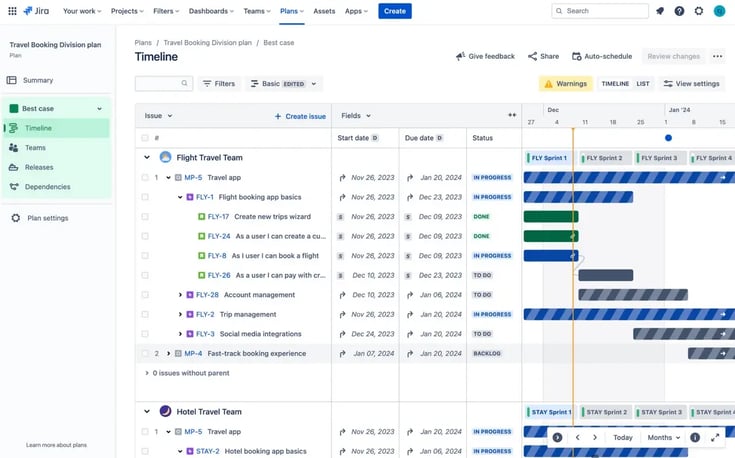
Every plan in Jira is built around issue sources, which define the data included in the plan. These sources help teams manage the right set of work items and adjust plans as needed.
- Boards: Scrum or Kanban boards tracking team progress.
- Projects: Issues tied to specific objectives or deliverables.
- Filters (JQL): Custom queries for specific issue sets.
Teams can refine issue sources over time, ensuring their plans stay aligned with evolving priorities.
Customizing the Issue Hierarchy
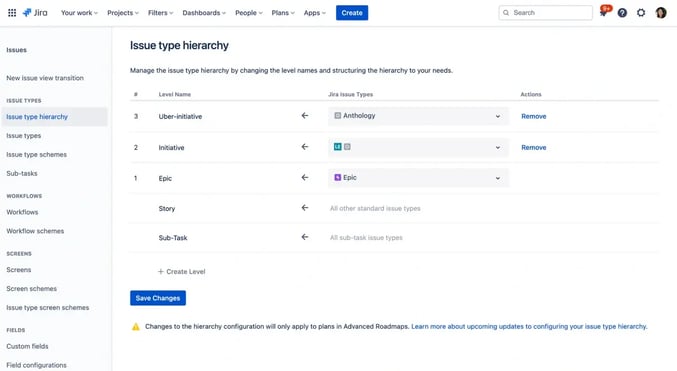
Jira Plans follows Jira’s default issue hierarchy but allows customization to better track large initiatives.
The standard hierarchy includes Epics, Stories, Tasks, Bugs, and Subtasks. However, teams can add an Initiative level above Epics to manage cross-team efforts or larger projects. This helps teams visualize how small tasks roll up into larger strategic goals.
By customizing issue hierarchy, organizations gain clearer visibility into project objectives and ensure that every work item contributes to a meaningful outcome.
Assigning Teams to a Plan
To ensure work is effectively managed, teams can be assigned to plans based on their issue sources.
- Teams can be imported from Atlassian’s Teams directory.
- Work can be filtered and grouped by teams.
- Capacity planning helps balance workloads across multiple teams.
This feature ensures that program managers can coordinate large-scale efforts, while team leads can manage individual workloads efficiently.
Managing Team Capacity
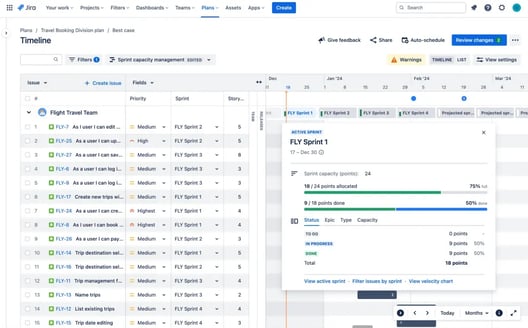
Capacity planning is a crucial part of Jira Plans. By accurately defining team capacity, organizations can prevent overallocation and ensure sustainable workloads.
Scrum teams can measure capacity in time or story points, while Kanban teams typically track it in time. For teams using Scrum boards, sprint planning capabilities allow them to assign work per sprint and flag overbooked teams.
This feature enables teams to optimize workloads and maintain a steady pace, ensuring that commitments remain realistic.
Handling Dependencies and Risk Management
Dependencies define the relationships between tasks, helping teams identify blockers or sequential work requirements.
- Visual indicators: Dependencies can be displayed as badges or connecting lines.
- Critical path mapping: Identify which tasks must be completed in sequence.
- Dependencies report tab: A detailed view of relationships between issues.
By proactively managing dependencies, teams can anticipate and resolve bottlenecks before they disrupt delivery timelines.
Planning for Different Scenarios
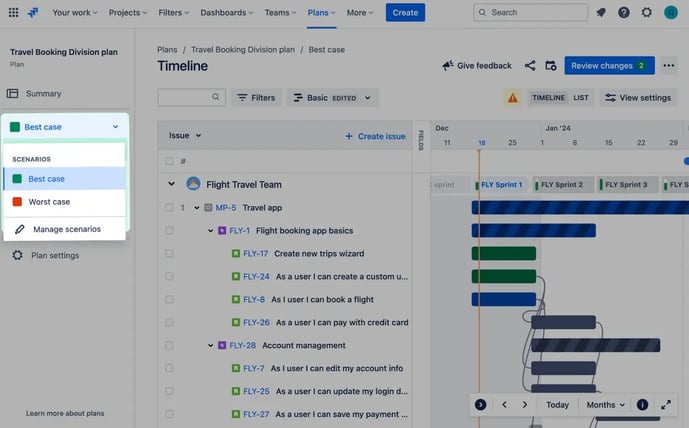
One of the most powerful features of Jira Plans is the ability to model multiple scenarios in a sandbox environment before making any commitments.
Teams can adjust variables such as timelines, resource allocation, and dependencies to simulate different outcomes. Whether planning for best-case or worst-case scenarios, this feature helps teams make informed decisions before finalizing changes in Jira.
By experimenting with alternative scenarios, teams gain flexibility in managing complex projects while mitigating potential risks.
Tracking & Reporting Progress
Keeping stakeholders informed is easy with Jira Plans' reporting capabilities.
The summary screen provides a high-level snapshot of issue progress, dependencies, and team workload. Custom views allow teams to tailor reports based on specific issue types, teams, or stakeholders’ interests.
By using tailored reporting, teams can deliver insights at the right level, whether for executives tracking milestones or project managers monitoring day-to-day progress.
Sharing Plans with Stakeholders
Transparency is key in project management, and Jira Plans makes it simple to share planning insights with teams and stakeholders.
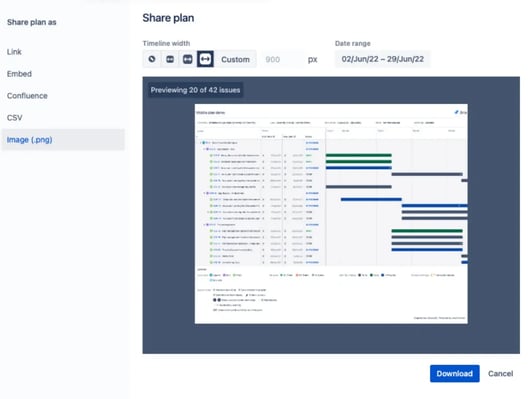
- Direct links allow stakeholders to view the most up-to-date plan details.
- CSV and PNG exports provide snapshots for executive reports or offline presentations.
- Plans ensure alignment across teams, leadership, and external partners.
With easy-to-share reports and real-time visibility, teams can collaborate effectively and keep all stakeholders aligned.
Take Your Planning to the Next Level
Jira Plans is an essential tool for teams managing complex projects, enabling seamless planning, capacity management, and risk assessment. Whether you’re aligning multiple teams or optimizing a single project, Jira Plans ensures clarity, efficiency, and confidence in decision-making.
Read next.
What Is Identity Debt in Atlassian Cloud Migration
Learn what identity debt means for Atlassian cloud migration and how to audit unowned accounts, stale permissions, and legacy access risks.
September 21, 2026Rovo Agent Governance in Atlassian Cloud: 2026 Guide
Learn how to govern Rovo agents in Atlassian Cloud with identity controls, Guard policies, workflow guardrails, and audit trails for enterprise AI adoption
September 19, 2026What Is Rovo Agent Governance in Atlassian Cloud
Learn how Rovo agent governance works in Atlassian Cloud, from permission models to admin controls, and configure AI agents securely.
April 16, 2026Change Management in Jira Service Management: A Guide
See how to manage organizational change effectively with Jira Service Management, using proven strategies for lasting adoption across teams
The blog, weekly.
One email a week with what we published. No drip sequence, and you can leave in a click.