

Bitbucket Packages Open Beta
Bitbucket Packages is a native container image registry built into Bitbucket Cloud, now in open beta, where you can push Docker images instead of using an outside service, and each image inherits its repository's permissions. The beta is free for Standard and Premium workspaces on monthly billing plans, and the feature will switch to a paid model at general availability.

Atlassian has unveiled Bitbucket Packages, a native container image registry built right into Bitbucket Cloud. This new feature, now available in open beta, introduces integrated artifact management to Bitbucket’s cloud platform. At Atlas Bench, we are excited about this development because it simplifies DevOps workflows for our clients. In this blog, we’ll break down what Bitbucket Packages is, why it matters, how to get started, and what to expect as the feature evolves all while keeping things balanced with both narrative sections and bullet point highlights for easy reading.
What Are Bitbucket Packages?
Bitbucket Packages is essentially a built-in container registry for Bitbucket Cloud. It allows teams to store and manage build artifacts directly within their Bitbucket Cloud workspace. Previously, many teams used external container registries or package repositories to handle these artifacts. Now, Bitbucket Cloud provides a native solution under the same roof as your source code and CI/CD pipelines. In practical terms, this means when you build a Docker image in your Bitbucket Pipeline, you can push that image to Bitbucket’s own registry instead of an outside service. Each image in Bitbucket Packages is associated with a specific repository, and it automatically inherits the repository’s permissions. If a user has read access to the repo, they can pull the image; if they have write access, they can push updates to that image. This tight integration eliminates the friction of managing separate credentials or permission sets across different systems. It’s all unified in Bitbucket Cloud, providing a seamless experience from code commit to deployment artifact. Another key aspect of Bitbucket Packages is the workspace-wide namespace for images. Your container images are organized under your Bitbucket workspace and categorized by repository. This structure helps keep artifacts logically grouped with the projects they belong to. Since it’s Atlassian-hosted, your team doesn’t need to maintain its own registry server or pay for a third-party registry service. In short, Bitbucket Packages brings convenience and efficiency by unifying code and container management in one place.
Why Bitbucket Packages Matters
Atlassian built Bitbucket Packages to address several common challenges teams face when using external artifact repositories alongside Bitbucket:
-
Fragmented workflows: Developers often had to switch between Bitbucket for source code and a separate registry for container images. This context-switching slows down productivity and complicates the development process.
-
Permission inconsistencies: Using an external registry means managing a separate set of user accounts and permissions. It’s easy for access controls to become misaligned with your Bitbucket repository permissions, potentially causing security gaps or access issues.
-
Duplicated efforts and costs: Maintaining disparate tools for code, CI/CD, and artifact storage leads to extra overhead. Teams might spend time duplicating configuration in multiple systems and pay additional fees for third-party registries or storage.
By introducing a native registry, Atlassian aims to streamline the DevOps toolchain. Bitbucket Packages keeps your code, pipelines, and container images all in one ecosystem. The result is less overhead managing tools, more consistent security, and potentially lower costs by consolidating services. This unified approach can make continuous integration and delivery more efficient: for example, your pipeline can build an image and push it to Bitbucket Packages, then your deployment can pull that image without any external authentication hassles. It’s a smoother workflow from start to finish, which is why we believe this feature will be valuable for many teams.

Features of the Open Beta
The current open beta of Bitbucket Packages is available to all Bitbucket Cloud Standard and Premium workspaces on monthly billing plans. If your team is on one of these plans, you can start using the feature right away (after a simple one-time setup of linking your Bitbucket workspace to your Atlassian organization account).
Key capabilities of the Bitbucket Packages beta include:
-
Native Docker image registry: You can publish Docker container images directly in Bitbucket Cloud. The registry is workspace-scoped, and images are tagged with a namespace that includes your workspace and repository. For example, an image might be tagged as
crg.apkg.io/your-workspace/your-repo:tag. This URL points to Bitbucket’s container registry (crg.apkg.io) under your workspace. -
Integrated permissions: Every image is linked to a specific repository, and it automatically uses that repository’s permission scheme. Repository admins control who can read or write images by managing the usual repo permissions. There’s no separate ACL to maintain for your artifacts: if a developer can push code to the repo, they can also push the Docker image for that repo.
-
Seamless Bitbucket Pipelines integration: While still early, the vision is that your Bitbucket Pipelines (Bitbucket’s CI/CD service) will work hand-in-hand with the registry. In this beta, you can manually add Docker push/pull steps in your pipeline to interact with Bitbucket Packages. As the feature matures, expect even tighter integration where authentication is handled automatically within Pipelines.
-
Feedback-driven development: Atlassian is using this open beta as an opportunity to gather user feedback. The functionality in this initial release focuses on core container image management. By trying it out and sharing your experiences, you’re helping shape the final product. Atlassian has already planned some enhancements, and user input will influence the priority and design of those features leading up to general availability.
During the beta period, Atlassian will be refining Bitbucket Packages. Users may notice updates or tweaks as Atlassian responds to feedback and prepares the feature for its official launch. It’s a good time to explore what’s there, evaluate how it fits your workflow, and provide any feedback on improvements you’d like to see.
Pricing and Availability
One important thing to understand is how Bitbucket Packages will be priced and made available now and in the future:
-
Free during beta: While Bitbucket Packages is in open beta, it is free to use for all eligible workspaces (Standard or Premium on monthly plans). There are no storage or bandwidth charges during this period. This is a great chance to trial the feature without worrying about costs.
-
General Availability (GA) launch: The feature is expected to reach general availability in early December 2025. At that point, Bitbucket Packages will switch to a paid model. It will still be available only for Standard and Premium tier workspaces (initially monthly plans only, with annual plan support coming later).
-
Included usage quotas: Upon GA, each plan will have some amount of storage and data transfer included at no extra charge. Standard plan workspaces get up to 1 GB of storage for images and 5 GB of network transfer per month included. Premium plan workspaces get 1.5 GB of storage and 7 GB of transfer per month included.
-
Pay-as-you-go overages: If you need more than the included amounts, you will pay based on usage. The rates announced are $0.35 USD per GB per month for storage beyond your plan’s allowance, and $0.70 USD per GB for network egress (image download traffic) beyond the included bandwidth. In other words, if your team stores a lot of images or has heavy image download activity (for example, in deployments), you’ll want to monitor usage to avoid surprises on your bill.
-
Stay informed: Atlassian will communicate the exact GA release date and any pricing updates through in-product alerts, community posts, and their blog. Since the switch to paid usage could impact your costs, Atlas Bench recommends keeping an eye on your current artifact storage and transfer levels. This way, you can make adjustments (like cleaning up unused images) before the meters start running.
To summarize, right now is the ideal time to experiment with Bitbucket Packages. It won’t cost anything during beta, and you can get a sense of how much storage/traffic your team might use. Then you can make an informed decision on managing usage or budgeting for the feature once the paid model kicks in at GA.

Getting Started with Bitbucket Packages
If you’re ready to give Bitbucket Packages a try, here’s how to get up and running:
-
Link your workspace to an Atlassian organization: Bitbucket Packages requires your Bitbucket Cloud workspace to be linked with an Atlassian organization. In Bitbucket settings, ensure your workspace is linked to your company’s Atlassian organization. This step is typically a one-time setup.
-
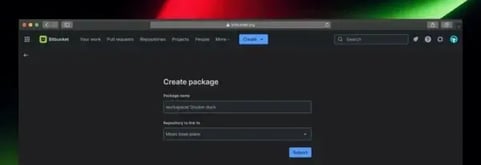
Create a package entry (first time per image): A Bitbucket package in this context refers to a container image name mapped to a repository. As a repository admin, go to Create > Package in the Bitbucket Cloud top navigation. Enter a name for your container image and select the repository it belongs to. This step essentially registers the image in Bitbucket so that the system knows this repository is allowed to store that image name. You only need to do this once for a new image name (for example, “my-app-backend”) per repository.
-
Set up authentication with an API token: To push and pull images, you’ll use an app password (also known as an API token) instead of your Bitbucket password. Generate a new token from your Bitbucket account with the following permissions scopes: read:package and write:package (these scopes specifically allow access to the package registry). When you have the token, you will use it as your password for Docker commands.
-
Log in to the container registry via Docker: In your terminal or CI pipeline, authenticate Docker to Bitbucket’s registry using your Bitbucket username (which is your Atlassian account email address) and the API token as the password. For example, run: When prompted for a password, paste the API token. If successful, Docker will be logged in to Bitbucket’s container registry (
crg.apkg.io). -
Build and push your container image: Now you can build a Docker image and push it to Bitbucket Packages. Use the image reference that points to Bitbucket’s registry. For instance, if your workspace is
example-workspaceand you created a package named “my-app” linked to the repo, tag the image as: Once built, push the image: This uploads the image to Bitbucket Packages. The first push will create the image repository in the registry under your workspace. -
Use the image in your workflows: After pushing, anyone with read access to that Bitbucket repository can pull the image for use. For example, a developer or a deployment script can run: This command fetches the container image from Bitbucket. You can now deploy it to your environments just as you would with an image from Docker Hub or any other registry.
-
Manage and view images in Bitbucket: Bitbucket’s interface now includes a Packages section. At the workspace level, there’s a Packages view listing all images in the workspace. Similarly, within each project or repository, you’ll find a Packages tab showing images associated with that project/repo. From these views, you can click on an image name to see details like available tags. Clicking a specific tag will show metadata such as the image digest (a unique identifier), image size, and the number of times it’s been downloaded. This UI makes it easy to inspect what images you have, remove old tags (feature for deletion is evolving as noted below), and keep track of usage.
Following the above steps, your team can start using Bitbucket Packages as part of your development pipeline. If this setup feels daunting or you’re unsure how it fits into your current CI/CD process, remember that Atlas Bench is here to help. As Atlassian experts, we can guide you through the setup or even automate it as part of your pipeline configuration. Once it’s configured, pushing and pulling images becomes a seamless part of your workflow.
What’s Next for Bitbucket Packages
Bitbucket Packages is in beta, which means there are more features and improvements on the horizon. Atlassian has outlined a few upcoming enhancements that are in the works as the feature progresses toward general availability and beyond:
-
Image deletion & garbage collection: In the future, admins will be able to delete container images or specific tags from the registry. Alongside manual deletions, Atlassian is developing an automated garbage collection process. This will help reclaim storage space by cleaning up unneeded or outdated images (for example, purging tags that haven’t been used in a long time). Efficient cleanup tools are important to prevent your storage usage from growing uncontrollably over time.
-
Deeper Bitbucket Pipelines integration: Expect a more streamlined experience when using Bitbucket Pipelines with the Packages registry. The goal is to have end-to-end integration where your pipeline can authenticate to the registry without extra scripts or manual
docker logincommands. This could involve built-in pipeline steps or variables that simplify pushing and pulling from Bitbucket Packages, making CI/CD flows even smoother. -
Support for more package types: Right now, Bitbucket Packages supports Docker container images. Atlassian plans to expand this to other package formats in the future. Think of package types like Maven (for Java artifacts), npm (Node.js packages), or other language-specific registries. Eventually, Bitbucket could become a one-stop package management solution for various artifacts beyond just Docker images. This expansion will further unify development workflows for teams using multiple technologies.
All of these planned enhancements are aimed at making Bitbucket Packages a robust, full-featured artifact management platform tightly integrated with the rest of Bitbucket. Atlassian is actively seeking feedback during the beta to prioritize these features. Users are encouraged to share their experiences, whether it’s suggestions for new capabilities or reporting any pain points through Atlassian’s community forums or support channels. Every bit of feedback will help shape the final product and future updates.
From our perspective at Atlas Bench, it’s great to see Atlassian investing in this area. We know that managing artifacts is a critical part of the software delivery process. Having it integrated means less context switching for developers and a more streamlined toolchain. We’ll be watching closely (and contributing feedback of our own) as these new features roll out.
Ready to Explore Bitbucket Packages?
Bitbucket Packages represents Atlassian’s commitment to streamline the developer workflow by bringing source code, CI/CD, and artifact management under one roof. If your team is using Bitbucket Cloud, this open beta is the perfect opportunity to try out the new container registry and see how it can simplify your development process.
Give it a spin while it’s free, and take note of how it impacts your workflow. You might find that having a native registry saves time and reduces complexity in your deployments. And as always, if you have any questions or want guidance on getting the most out of Atlassian tools, we’re here to help.
Read next.
Non-human identities in Atlassian Cloud, explained
How to govern non-human identities in Atlassian Cloud: service accounts, API tokens, Forge apps, and Rovo agents, each with an owner, scope, and expiry.
October 1, 2026How to choose an Atlassian partner for a Jira migration
How to choose an Atlassian Solution Partner for a Jira migration to Cloud: what to verify, eight questions to ask, red flags, and a shortlist scorecard.
September 30, 2026The complete guide to agent readiness in Atlassian Cloud
Agent readiness for Atlassian Cloud: the five checks to run before you switch on Rovo agents, from identities and permissions to the off switch.
September 28, 2026How to review Rovo agent access in Jira and Confluence
A step-by-step access review for Rovo agents in Jira and Confluence: who can create them, who can use them, what they can change, and what gets logged.
The blog, weekly.
One email a week with what we published. No drip sequence, and you can leave in a click.