

Atlassian Connect EOL: Everything You Need to Know
Atlassian Connect end of support begins January 31, 2027. See the three-phase timeline, what changes for Connect apps, and what to do now.

Atlassian has officially announced the end-of-life (EOL) for Atlassian Connect, signaling a major shift for anyone developing or using apps in the Atlassian ecosystem. Atlassian Connect, the longstanding framework for extending Jira, Confluence, and other Atlassian cloud products, is being phased out in favor of Atlassian Forge, Atlassian’s modern cloud app platform. Connect end of support begins on January 31, 2027. This transition has big implications for software teams, Marketplace app vendors, and the businesses that rely on those apps. In this blog post, we break down everything you need to know about the Connect EOL: the timeline of key phases, what makes Forge different from Connect (in plain English), and how to prepare your team for a smooth migration. Both technical stakeholders and business decision-makers will find strategic insights and actionable guidance to navigate this change with confidence.
Why Atlassian is Moving from Connect to Forge
Atlassian Connect has been the backbone for cloud app development on the Atlassian Marketplace for years. It allowed developers to build add-ons that run on external servers and embed within Atlassian products via iframes. While Connect enabled a rich ecosystem of apps, it also came with challenges: app developers had to manage their own infrastructure, security tokens, and compatibility as Atlassian products evolved. From a customer perspective, installing a Connect app meant trusting a third-party service to handle data and functionality.
Atlassian Forge, introduced more recently, addresses many of these challenges by providing a cloud platform where Atlassian hosts the app code for you. Forge offers a more integrated and secure approach; think of it as Atlassian’s own serverless app environment. By moving to Forge, Atlassian aims to ensure all cloud apps run within their trusted environment, improving security, performance, and the overall user experience. In short, Forge is the future of Atlassian app development, and Atlassian is phasing out Connect to unify the ecosystem on this modern platform.
Some key reasons driving this transition include:
-
Security & Trust: Forge apps operate within Atlassian’s cloud infrastructure with fine-grained permissions, reducing risks compared to external Connect apps that use shared secrets and iframes.
-
Simplified Maintenance: Forge eliminates the need for partners or customers to host and update app servers. Atlassian handles the heavy lifting of scaling and infrastructure, so developers can focus on functionality.
-
Unified Experience: With Forge’s native UI components and authentication, apps feel more closely integrated into Jira or Confluence. This creates a smoother experience for end users than the older Connect approach.
-
Future Innovation: Atlassian is investing heavily in Forge. New extensibility features, performance improvements, and product integrations will arrive on Forge first (and sometimes only on Forge). Connect, on the other hand, will not receive new features as it winds down.
Three Phases of Atlassian Connect End-of-Life
Atlassian is taking a phased approach to retire Atlassian Connect, giving organizations time to adapt. There are three key phases in the Connect End-of-Life timeline, each with its own policies and enforcement dates:
-
Phase One: No New Connect Apps on Marketplace (Enforcement: September 17, 2025) Since September 17, 2025, Atlassian Marketplace no longer accepts new apps built on Connect. Any new cloud app listing must be built on Forge and contain no Connect modules. Existing Connect apps already listed on the Marketplace can remain for now, but this marks the cutoff for any new Connect-based offerings. (Atlassian announced this phase in March 2025, providing roughly 6 months’ notice before enforcement.)
-
Phase Two: No New Updates to Connect Apps (Enforcement: March 2026) Since March 2026, Marketplace apps with a Connect descriptor can no longer be updated, so they cannot ship new versions or changes. Essentially, if an app is still on Connect by March 2026, the developer won’t be able to publish further enhancements or fixes through the Marketplace. Additionally, the ability to install new private Connect apps (custom apps via direct installation) is no longer available; any new custom extensions should use Forge. Apps that have adopted the Forge manifest (even if they still use some Connect modules) can still receive updates, but pure Connect apps are frozen.
-
Phase Three: Connect Reaches End of Support (Enforcement: January 31, 2027) Atlassian moved this date from December 2026 to January 31, 2027, to give teams more time around the holidays and year-end planning. From that date, Atlassian will only address critical security vulnerabilities in Connect, and support SLAs will be relaxed. Connect will no longer evolve with the Atlassian platform. Its capabilities can be deprecated with much less notice, and some changes may stop Connect apps from working without advance notice. Atlassian will not update or rewrite installed private apps for you. Since mid-July 2026, Atlassian has been rolling out Connect end of support warnings on the Connected apps page in Atlassian Administration. Plan to have migrated off Connect before January 31, 2027, so you are not running unsupported apps.
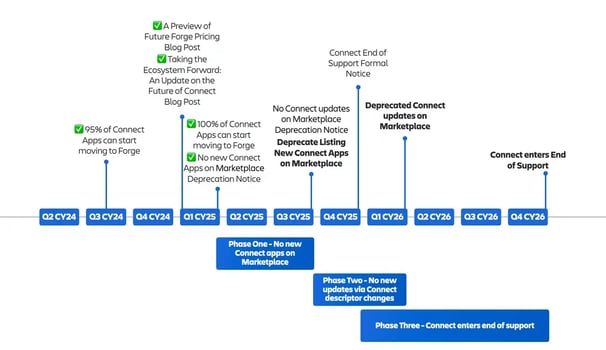
Atlassian’s original timeline above placed end of support in Q4 2026. Atlassian has since moved it to January 31, 2027.
Forge vs. Connect: Key Differences Explained
For those less familiar with the technical side, here’s a plain-language breakdown of how Atlassian Forge differs from Connect and why it matters:
-
Hosting and Infrastructure: Connect apps run on external servers or cloud services managed by the app developer or vendor. In contrast, Forge apps run on Atlassian’s infrastructure (in a secure AWS Lambda-based environment managed by Atlassian). This means with Forge, you don’t need to run your own server; Atlassian handles the execution of your app’s code whenever needed. For businesses, this shift means less worry about third-party servers handling your data; everything stays within Atlassian’s cloud.
-
Authentication and Security: Connect uses JSON Web Tokens (JWT) for authentication, where the app and Atlassian exchange tokens to prove identity. This requires careful handling of secrets on the developer’s side. Forge uses Atlassian’s OAuth 2.0 system and built-in permissions (scopes) for apps. Forge apps operate within a sandbox with strict controls, aligning with Atlassian’s cloud security standards out-of-the-box. The result is a more secure model with Forge. For example, Forge apps can’t access data or make calls outside the permissions you grant, and Atlassian can enforce security policies globally.
-
User Interface Integration: Connect apps inject UI elements into Atlassian products via iframes (essentially embedded web pages). While functional, iframes can sometimes feel a bit isolated or load slightly slower, and styling must match Atlassian’s look manually. Forge apps can use Atlassian’s Forge UI kits or custom UI options that render content more natively inside the product interface. This means Forge UIs tend to be more consistent with the host application’s look and feel. In practical terms, Forge can provide a smoother user experience, as the app’s interface is tightly integrated (and there’s no separate server call to fetch an iframe for each view).
-
Development and Deployment: With Connect, developers had to write a web application, host it, maintain the Connect descriptor (a JSON file listing all the integration points), and handle updates themselves. Deployment might involve updating servers or cloud services and then updating the app descriptor. With Forge, development involves writing functions (in Node.js or similar) and defining a Forge manifest (YAML) for app capabilities. Deploying is as simple as running a CLI command to push the app to Atlassian’s cloud. Forge handles the rest: provisioning, scaling, and updating the app in the Marketplace automatically. This can greatly simplify the lifecycle of an app for development teams.
-
Capabilities and Limitations: Over time, Atlassian has been bridging the gap so that most Connect features have Forge equivalents. Forge now supports a wide range of modules (like UI components, web triggers, scheduled tasks, etc.) that cover the majority of use cases from Connect. However, not everything is identical: a few Connect modules or low-level capabilities are not available on Forge, often due to security or low usage reasons. (Atlassian has published lists of which Connect features are available in Forge and which are not planned.) For most apps, Forge will meet all needs, but if you have a very specific Connect feature your app relies on, you should check Atlassian’s documentation to see if Forge supports it or if there’s a roadmap for it. The good news is Atlassian is continually adding to Forge, and any critical gaps for popular apps are likely being addressed.
-
Performance and Scalability: Because Forge runs within Atlassian’s cloud, users may experience faster load times for certain interactions (no need to reach out to an external site for data that Atlassian could already have in-cloud). Atlassian also manages scaling the app code execution: for example, if your app suddenly gets heavy usage, Atlassian’s platform will scale up the compute power, something a Connect vendor would have to handle themselves. That said, Forge has usage quotas and limits (to prevent abuse and ensure fairness in a multi-tenant environment), but these are generally generous and Atlassian provides guidance on them. For businesses, Atlassian-managed scaling means potentially more reliable apps with less downtime.
In summary, Forge is designed to make apps safer, easier to manage, and better integrated into the Atlassian Cloud experience. Connect was a great solution in its time, but Forge is the evolution that aligns with Atlassian’s cloud-first, security-first strategy.
Preparing Your Team for the Transition
With the end-of-support dates on the horizon, it’s crucial to start planning your migration from Connect to Forge sooner rather than later. A successful transition involves both technical preparation and strategic planning. Here are actionable steps and considerations for teams preparing to navigate the Connect EOL:
-
Audit Your Atlassian Apps: Begin with a thorough inventory of all Atlassian apps (both those you’ve built in-house and third-party Marketplace apps you’ve installed). Identify which ones are Atlassian Connect apps. For in-house (custom) Connect apps, this should be well-known. For Marketplace apps, you can usually find in the app documentation or listing whether it’s built on Connect or Forge. This audit will clarify your exposure to the Connect EOL and prioritize what needs attention.
-
For In-House Developers: Start Experimenting with Forge If your development team maintains custom Connect apps or integrations, encourage them to get hands-on with Atlassian Forge as early as possible. Set up a development environment for Forge and try migrating a small, non-critical part of a Connect app to Forge as a pilot. This will reveal any learning curve issues or feature gaps while you still have time to adjust. Atlassian provides documentation, migration guides, and even a Forge migration toolkit to assist developers. It may also be wise to review Atlassian’s Forge Equivalence Roadmap (which shows the status of various features on Forge) to ensure the features you need are supported. If some needed feature isn’t available yet, you’ll need to plan around that, possibly waiting until Atlassian implements it, or finding an alternative approach using Forge’s existing features.
-
For Business and IT Leaders: Engage with App Vendors If you rely on third-party Marketplace apps that are built on Connect, reach out to those vendors or watch their announcements. Reputable app vendors are likely already working on Forge versions of their apps, given Atlassian’s timeline. However, it’s important to confirm this. Ask vendors about their migration roadmap to Forge and expected timelines. Most vendors will aim to migrate well before Phase 3 (January 31, 2027) to avoid disruption. If a critical app has no clear Forge migration plan, you might need to evaluate alternatives in the Marketplace or involve Atlassian/partners for guidance. Your goal is to avoid being stuck with an essential tool that suddenly isn’t supported.
-
Plan Updates and Testing Cycles: Migrating from Connect to Forge isn’t just a flip of a switch; it will involve refactoring code, deploying the new app version, and testing it thoroughly within your Jira/Confluence environment. Build a timeline for these activities aligned with Atlassian’s phases. For example, aim to have any custom app fully on Forge, with the Connect version retired, a few weeks before end of support on January 31, 2027. This buffer gives you time to catch and resolve any issues. Coordinate with stakeholders to schedule testing in a staging environment, and possibly run the Forge app in parallel with the Connect app for a short period to compare results and ensure feature parity.
-
Consider a Phased Migration or Hybrid Approach Atlassian allows some level of a hybrid app during the transition: an app can technically include both a Connect descriptor and a Forge manifest (this is sometimes called “Bridge” or Forge remote for Connect). While ultimately you need to remove all Connect modules, you can use this to incrementally move functionality. For instance, you might migrate backend services to Forge (using Forge functions or Forge Remote calls to your existing server) while temporarily still using some Connect modules for UI until the Forge UI is ready. This phased approach can reduce risk by not changing everything at once. Keep in mind, though, that since Phase 2 (March 2026) any update requires a Forge manifest in the app.
-
Budget and Resource Allocation: From a project management perspective, ensure you allocate the necessary resources, budget, and time for this migration. While Forge development can be quicker than Connect in some respects, there will be effort involved in redesigning parts of the app and retesting. If you have multiple apps to migrate, decide if you need additional staff or external help (such as an Atlassian Solution Partner) to meet the timelines. Connect end of support begins on January 31, 2027, so treat these migrations as high-priority projects now.
-
Use Atlassian and Partner Support: Don’t go it alone if you don’t have to. Atlassian has provided tools (like Forge Migration Guides, example code, and community support) specifically to help with this transition. Take advantage of Atlassian Community forums to ask questions; many developers are in the same boat, and Atlassian engineers are actively helping with Forge adoption issues. Additionally, consider engaging with Atlassian Solution Partners (like Atlas Bench) who specialize in Atlassian migrations. We’ve worked with many clients on migrations and app development, so we can share best practices or even shoulder some of the migration workload for you. Sometimes an experienced partner can save you time by avoiding pitfalls others have encountered.
-
Communicate to End Users: If the Connect-to-Forge migration will cause any noticeable changes for your end users, have a communication plan. Ideally, a well-done migration is transparent (users shouldn’t notice if an app now runs on Forge except maybe things working faster or more reliably). But if there will be downtime or reconfiguration needed (perhaps users need to reauthorize a Forge app, or there’s a slight UX change), let your team or customers know in advance. This will build confidence that you’re proactively managing the change. From the business angle, proactive communication shows you’re on top of the transition and helps avoid confusion when Phase 3 arrives on January 31, 2027.
By following these steps, your organization will be in a strong position to navigate the shift from Connect to Forge with minimal disruption. The key is to start early and treat the migration as a strategic initiative, not a last-minute fix. With good planning, you might even turn this into an opportunity, perhaps improving some app features during the rebuild or streamlining your app portfolio.

Wrapping up
The end-of-life of Atlassian Connect marks a significant evolution in the Atlassian ecosystem. While change can be challenging, Atlassian’s phased approach and the capabilities of Forge provide a clear path forward. By understanding the timeline and differences, and by preparing diligently, technical teams can ensure their apps and integrations continue to thrive on Forge. Business decision-makers, meanwhile, can take comfort that this transition is aimed at better security, reliability, and innovation for the tools your organization relies on. In essence, Forge is the future of extending Atlassian products, and those who adapt early will reap the benefits of a more streamlined and secure app experience.
Read next.
Non-human identities in Atlassian Cloud, explained
How to govern non-human identities in Atlassian Cloud: service accounts, API tokens, Forge apps, and Rovo agents, each with an owner, scope, and expiry.
October 1, 2026How to choose an Atlassian partner for a Jira migration
How to choose an Atlassian Solution Partner for a Jira migration to Cloud: what to verify, eight questions to ask, red flags, and a shortlist scorecard.
September 30, 2026The complete guide to agent readiness in Atlassian Cloud
Agent readiness for Atlassian Cloud: the five checks to run before you switch on Rovo agents, from identities and permissions to the off switch.
September 28, 2026How to review Rovo agent access in Jira and Confluence
A step-by-step access review for Rovo agents in Jira and Confluence: who can create them, who can use them, what they can change, and what gets logged.
The blog, weekly.
One email a week with what we published. No drip sequence, and you can leave in a click.